
Applying to 100 Jobs With Zero Calls? The 7 Naukri Profile Hacks You Need to Know
Table of Contents
Introduction
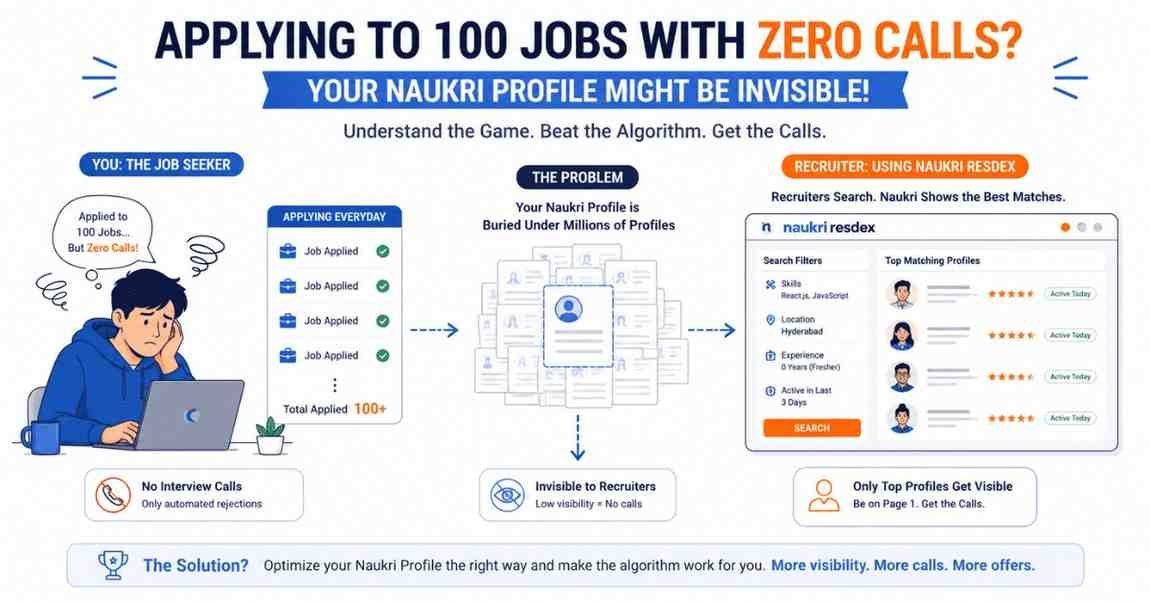
Let’s be honest for a second. You wake up, open the Naukri.com app, go to the “Recommended Jobs” section, and start hitting the “Apply” button like you are playing a video game.
Apply. Apply. Apply.
You do this 50 times a day. You feel productive. You close the app thinking, “I applied to so many MNCs today; someone is bound to call me.” But a week goes by, and your phone doesn’t ring. The only emails you get are automated rejections. You start to think that the job market is completely dead, or that nobody wants to hire freshers anymore.
Here is the harsh reality: The problem isn’t the job market, and the problem isn’t your degree. The problem is that your Naukri profile is invisible.
Most fresh graduates treat Naukri.com like a drop-box. You drop your resume in and pray someone finds it. But that is not how Naukri works. Naukri is a Search Engine, exactly like Google.
If you don’t know how to do “SEO” (Search Engine Optimization) for your Naukri profile, you will never show up on page one when an HR manager searches for candidates. In this deep-dive guide, I am going to pull back the curtain on how recruiters actually use Naukri, and I will give you the 7 proven hacks to optimize your profile so the HRs start calling you.
Chapter 1: The Insider Secret – How HRs Actually Use Naukri
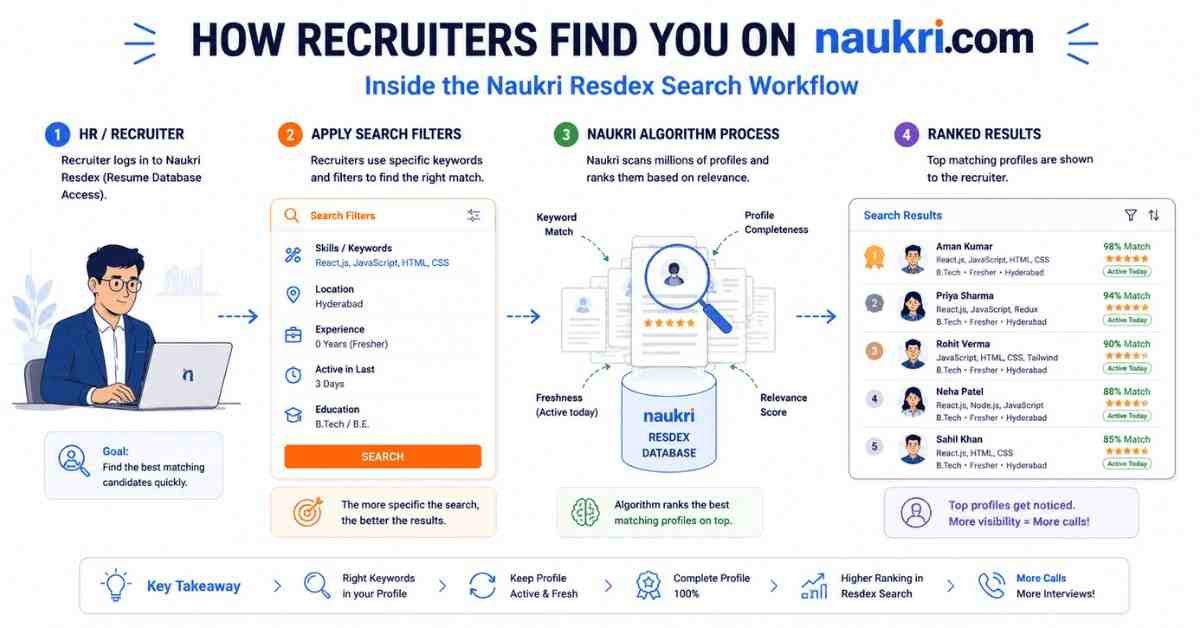
Before we fix your profile, you need to understand what happens on the other side of the screen.
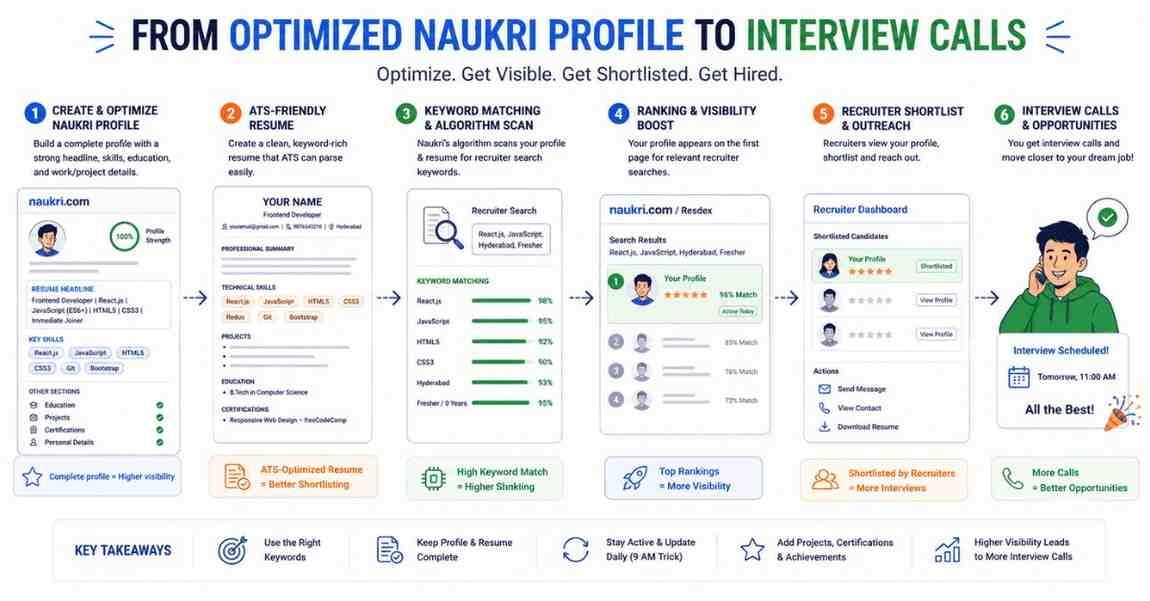
When a company wants to hire a “Junior React Developer,” the HR manager rarely sits and waits for people to apply. Sorting through thousands of random applications is exhausting. Instead, they use a paid tool called Naukri Resdex (Resume Database Access).
Think of Resdex as Google for recruiters. The HR types specific keywords into a search bar:
- Keywords: React.js, JavaScript, HTML, CSS
- Location: Hyderabad
- Experience: 0 Years (Fresher)
- Active in the last: 3 Days
The Naukri algorithm scans millions of profiles and spits out a list of matching candidates. If your profile does not perfectly match their search filters, you do not exist. Even if you applied to their job directly, if your profile isn’t optimized, you are buried on page 50.
Our goal is to get your profile to Page 1 of the Resdex search results. Let’s execute the 7 hacks to make that happen.
Hack 1: The "9 AM Profile Freshness" Trick (The Ultimate Hack)
If you only take one piece of advice from this entire blog, let it be this.
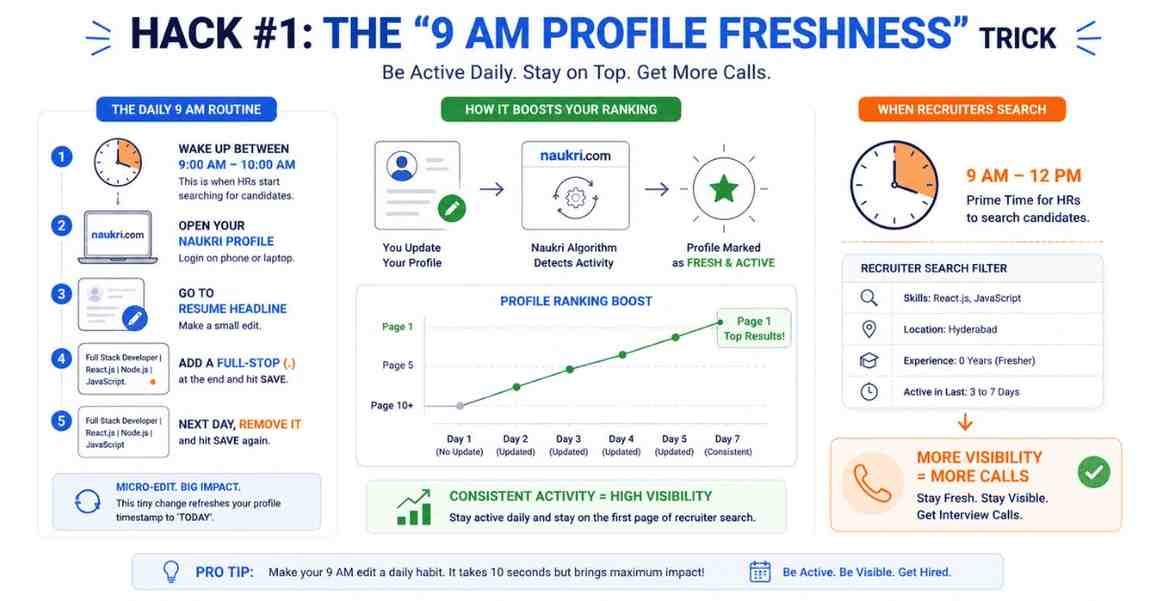
Naukri’s algorithm heavily favors “Active Candidates.” When an HR searches for a candidate, they always filter the results by “Active in the last 7 days.” They do this because they don’t want to waste time calling someone who got a job three months ago and abandoned their profile.
If you haven’t updated your profile in a month, your profile is pushed to the bottom of the database.
How to hack this: You need to trigger the algorithm to think you just updated your profile every single day.
- Wake up between 9:00 AM and 10:00 AM (This is when HRs log into their computers and start searching).
- Open your Naukri profile on your phone or laptop.
- Go to the “Resume Headline” section.
- Add a simple full-stop (.) at the end of the sentence and hit Save.
- The next day, delete the full-stop and hit Save.
By making this micro-edit every single morning, your “Last Updated” timestamp refreshes to “Today.” When an HR searches for your skills at 10:30 AM, your “fresh” profile will sit right at the top of Page 1.
Hack 2: Your Resume Headline is Your Billboard
Your Resume Headline is the very first thing a recruiter sees in their search results. It is the hook.
The Fresher Mistake:
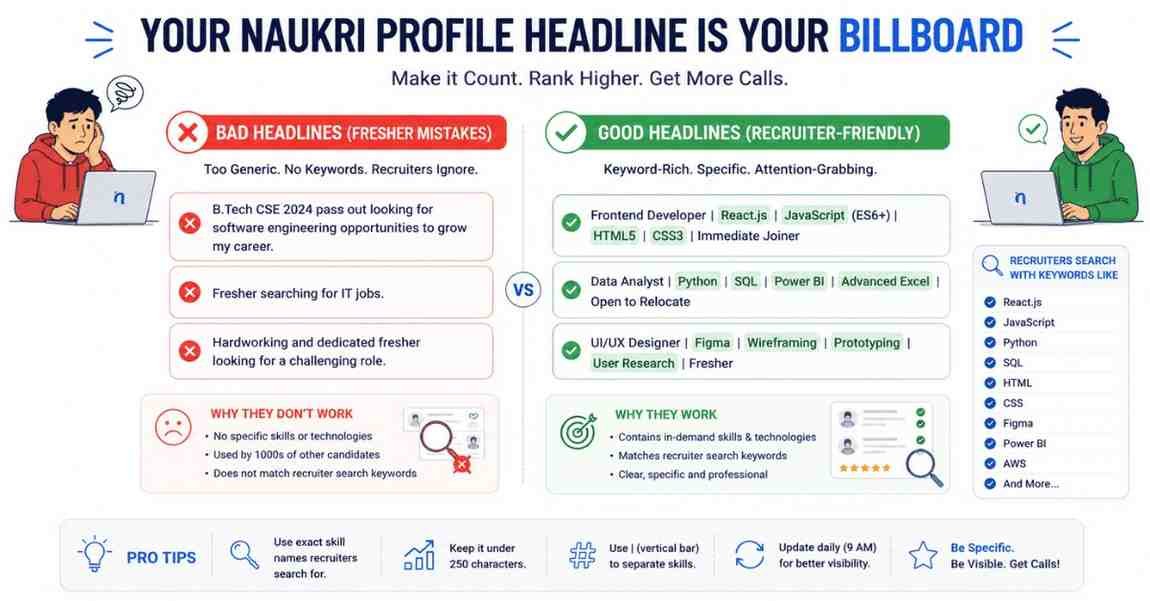
90% of freshers write terrible headlines like this:
- ❌ B.Tech CSE 2024 pass out looking for software engineering opportunities to grow my career.
- ❌ Fresher searching for IT jobs.
Why is this bad? Because no HR in the world goes to the search bar and types “B.Tech CSE 2024 pass out.” They search for specific technologies.
The Professional Fix:
Your headline must be a keyword-dense summary of your exact skills. It should read like a catalog of what you can do.
- ✅ Frontend Developer | React.js | JavaScript (ES6+) | HTML5 & CSS3 | Immediate Joiner
- ✅ Data Analyst | Python | SQL | PowerBI | Advanced Excel | Open to Relocate
- ✅ UI/UX Designer | Figma | Wireframing & Prototyping | User Research | Fresher
The ChatGPT Headline Prompt
Don’t want to think too hard? Let ChatGPT write your headline. Copy and paste this prompt:
“Act as an expert IT Recruiter. I am a fresher looking for a job in [Insert Role, e.g., Cloud Computing]. My core skills are [Insert 4-5 skills, e.g., AWS, Linux, Networking, Python]. Write 5 highly optimized, keyword-rich Naukri.com resume headlines for me. They must be punchy, separate skills with vertical bars (|), and be under 250 characters. Do not use words like ‘passionate’ or ‘seeking opportunities’.”
Pick the best one and paste it into Naukri immediately.
Hack 3: Set "Expected Salary" to Zero
This is a psychological and algorithmic hack that most people completely miss.
When filling out your Naukri profile, there is a field for “Current Salary” (which will be 0 for freshers) and “Expected Salary.” Many freshers, confident in their worth, will put “5,00,000” or “6,00,000” in the expected salary box.
Here is the problem: When an HR uses Naukri Resdex, they input their budget. If a startup is looking for a fresher and their maximum budget is ₹4,00,000, the HR will set the search filter to “Max Expected Salary: 4LPA.”
Because you wrote 5LPA, the algorithm will hide your profile from that HR completely. You won’t even get the chance to interview.
The Fix:
Set your “Expected Salary” to ₹0 (or leave it blank/negotiable if the UI allows).
By keeping it at zero, your profile will show up in every single search query, regardless of the HR’s budget. The goal is to get the interview call. Once they fall in love with your skills during the technical round, then you negotiate the salary. Never filter yourself out of an opportunity before it even begins.
Hack 4: "Key Skills" are your SEO Tags
In the Naukri ecosystem, your “Key Skills” section dictates your search ranking. The more your key skills overlap with the Job Description, the higher you rank.
The Mistake:
Listing soft skills instead of hard technical skills. Do not waste precious keyword space writing: Hardworking, Punctual, Good Communication, Leadership, Quick Learner. Nobody searches for a “Quick Learner” in a database. They search for “Node.js.”
The Fix:
Fill your Key Skills section entirely with hard, technical tools, software, and frameworks. Furthermore, use multiple variations of the same skill because different HRs type things differently.
- Instead of just “React”, write: React, React.js, ReactJS.
- Instead of just “Database”, write: SQL, MySQL, MongoDB, RDBMS.
- If you are targeting Non-IT to IT roles, list your enterprise tools: Workday, SAP, Jira, Agile Methodology, Advanced Excel.
Always max out the number of skills Naukri allows you to add. If you have done the Frontlines Edutech Web Dev or Data courses, list every single micro-skill you learned in those modules.
Hack 5: Notice Period = Immediate Joiner
In the corporate world, time is money. When a company decides to hire a fresher, it usually means a project has just started, or someone left the company suddenly, and they need hands on deck yesterday.
If your profile says your notice period is “1 Month” or “15 Days” (perhaps because you are waiting for college exams to finish, or you are in a part-time job), many recruiters will skip you. They want people who can join on Monday morning.
The Fix:
Always set your Notice Period to “Immediate Joiner” (or 0-15 days max).
This puts a green flag on your profile. Recruiters actively use a specific filter in Naukri called “Show only Immediate Joiners.” By having this toggled, you instantly bypass thousands of candidates who are stuck in 90-day notice periods at other companies.
Hack 6: Transform "College Projects" into "IT Experience"
The “Projects” section on Naukri is highly underrated. Most freshers leave it blank, or they write something vague like, “Final year library management system.”
If you are a fresher, your projects are your experience. You need to treat this section as if you were describing a job at a real company.
The Professional Fix:
Use the STAR Method (Situation, Task, Action, Result) in your project description box, and heavily inject keywords.
Let’s say you built a Spotify clone during your training at Frontlines Edutech. Do not just write: “Made a music player.”
Write it like this:
- Project Name: Fully Responsive Spotify Web Clone
- Tech Stack: React.js, Context API, CSS3, Vercel
- Description: Designed and engineered a full-stack music streaming interface mimicking Spotify. Integrated third-party APIs to fetch real-time song data. Implemented a responsive UI ensuring seamless playback across mobile and desktop devices. Deployed the live application using Vercel.
When you write it like this, the Naukri algorithm picks up the words React.js, APIs, Responsive UI, and Vercel, boosting your profile’s relevance score for Frontend Developer searches.
Hack 7: Attach an ATS-Friendly Resume
Your Naukri profile is the bait; your attached resume is the hook.
Once an HR clicks on your optimized Naukri profile, the very first thing they will do is click “Download Resume.” If they download it and see a messy, two-column Canva design with fancy fonts and photos, they will close it immediately.
Furthermore, Naukri’s internal parser reads the document you upload to automatically fill in data. If your resume isn’t ATS-friendly, Naukri will parse it incorrectly, garbling your data in the database.
The Fix:
You must upload a clean, single-column, ATS-compliant resume.
If you haven’t built one yet, stop what you are doing and go read The 10-Minute ATS Resume Guide (With ChatGPT Prompts).
Pro Tip: Naukri gives you the option to upload your resume. Always upload it in both Word (.docx) and PDF formats if the platform allows, or stick to a clean .docx file as it parses the easiest in legacy recruitment systems.
Bonus Hack: Profile Completion Must Be 100%
Naukri gives you a “Profile Completeness” score on your dashboard. Do not leave it at 85% or 90%.
The algorithm favors complete profiles.
- Have you added a professional, clear headshot? (No sunglasses, no selfies—wear a solid shirt against a plain background).
- Have you filled out your language proficiencies?
- Have you verified your mobile number and email ID?
- Have you added your “Summary/Profile Statement”? (You can use the exact same Professional Summary from your ATS resume here).
Push that progress bar to a solid 100%.
Conclusion: Time to Take Action
Let’s summarize the blueprint to hack the Naukri algorithm:
- Refresh your profile daily at 9:00 AM using the full-stop trick.
- Write a keyword-heavy Headline (Use the ChatGPT prompt provided).
- Set Expected Salary to ₹0 to stay in all budget searches.
- Use hard technical tools in your Key Skills section.
- Set your Notice Period to “Immediate Joiner.”
- Detail your Projects like corporate work experience.
- Upload a 100% ATS-friendly Resume.
Job hunting in 2026 is not about luck; it is a game of data and algorithms. By implementing these 7 hacks, you are no longer blindly throwing applications into a black hole. You are optimizing yourself to be found by the exact people who hold the keys to your career.
What’s Next in the “Job Ready 2026” Series?
Naukri is powerful for inbound recruiter calls, but it is still a traditional job portal. What if you want to bypass the portal entirely and have HRs message you directly on a platform where you can chat with them?
In Episode 3, we will dive into LinkedIn Profile SEO. I will show you how to turn your LinkedIn profile into a magnet for MNC recruiters, including the exact “About” section templates that make HRs DM you with job offers.
👉 Action Item for Today: Open your Naukri app right now. Delete your old headline, run the ChatGPT prompt, and update your skills. Set an alarm for 9:00 AM tomorrow to update your profile freshness.
If you are serious about upgrading your technical skills so you actually have high-value projects to put on your profile, explore the AI-Proof certification paths at Frontlines Edutech. See you in the next post!