
Headline Optimization Strategies
Table of Contents
Your LinkedIn headline is like a newspaper headline. If it’s boring, nobody reads the article.
Most people’s headlines look like this:
- “Student”
- “Fresher”
- “Looking for a job”
- “Senior Software Developer at XYZ Company”
These headlines are invisible to recruiters. Here’s why: they don’t tell recruiters who you are, what you do, or what value you bring.
The best headlines tell a story in one sentence. Let me show you how.
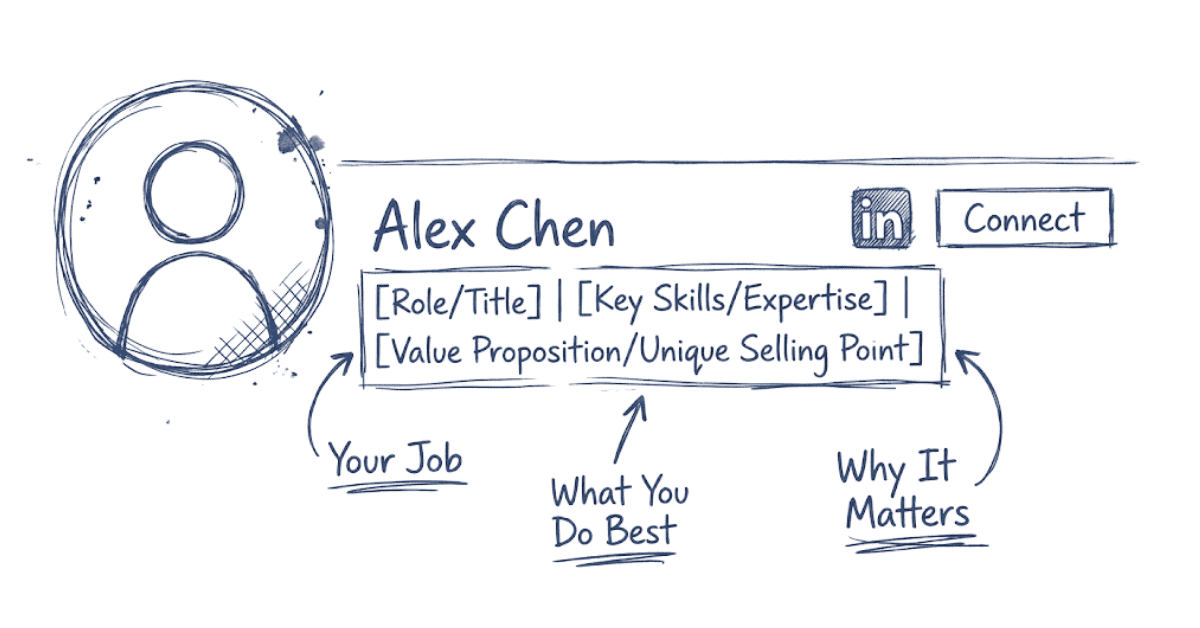
The LinkedIn Headline Formula That Works
“Want to Improve More Than Just Your Headline? Explore Frontlines Media’s Career Resources →”
The strongest headlines follow this structure:
[Your Role/Title] | [Top Skill 1] | [Top Skill 2] | [Key Benefit or What You’re Seeking]
For a Fresher:
❌ Bad: “Student”
✅ Good: “Fresher | Digital Marketing | Content Writing | Social Media Strategy | Seeking Internship in Marketing”
For an Experienced Professional:
❌ Bad: “Senior Manager”
✅ Good: “Senior Digital Marketing Manager | SEO Strategy | Team Leadership | Drove 200% Organic Growth | Hiring for My Team”
For a Job Switcher:
❌ Bad: “Career Changer”
✅ Good: “Marketing Professional Transitioning to Data Analytics | Excel Expert | Google Analytics Certified | Python Basics”

Why This Formula Works
- Keywords First – Recruiters search for job titles and skills. By putting them in your headline, you match their searches.
- Specificity Over Generic – “Software Developer” is generic. “Full-Stack Developer | React | Node.js | Building Scalable Web Apps” is specific. Specificity = higher rankings.
- Value Proposition – Saying “Drove 200% Organic Growth” or “Managed 50+ Partnerships” shows what you’ve accomplished, not just what you do.
Intent Clarity – Adding “Seeking role” or “Open to opportunities” tells recruiters you’re actively looking.
Research Your Target Keywords
Before you write your headline, do keyword research:
Step 1: Open 5 job descriptions for roles you want.
Step 2: Highlight common keywords and phrases:
- Job titles (e.g., “Digital Marketing Executive,” “SEO Specialist”)
- Skills (e.g., “Google Analytics,” “Keyword Research,” “Campaign Management”)
- Tools (e.g., “HubSpot,” “Semrush,” “Excel”)
- Outcomes (e.g., “Lead Generation,” “Conversion Optimization”)
Step 3: Create a keyword list. Example for a Digital Marketing role:
- Digital Marketing
- SEO
- Content Strategy
- Social Media
- Google Analytics
- PPC
- Lead Generation
- Campaign Management
Step 4: Incorporate top 3-4 keywords in your headline.

Headline Examples by Role (Real-World Tested)
Digital Marketing Fresher:
“Fresher | Digital Marketing | SEO | Content Writing | Seeking Marketing Internship”
Why it works: Role clarity + 3 relevant skills + intent
Data Analytics Professional:
“Data Analytics Manager | Python | SQL | Tableau | Reduced Costs by $500K Through Data Insights”
Why it works: Seniority + technical skills + quantified result
Web Developer (Career Switcher):
“Full-Stack Developer | JavaScript | React | Node.js | Career Changer From Finance”
Why it works: Stack clarity + career story + technical skills
HR Manager:
“HR Manager | Talent Acquisition | Employee Engagement | Scaled Team From 50 to 200 | Open to Partnerships”
Why it works: Role + expertise areas + achievement + openness to collaboration
Sales Executive (Fresher):
“Sales Executive Fresher | B2B Sales | LinkedIn Outreach | CRM Tools | Seeking Sales Development Role”
Why it works: Honest about fresher status + specific skills + role clarity
Want More Career Tips?
Read our latest guides to help you get interview-ready. Read Career Guides →

Common Headline Mistakes to Avoid
Mistake 1: Using All 220 Characters Without Structure
❌ “I am a creative professional with skills in photography, videography, graphic design, animation, and I’m also skilled in social media marketing, content creation, and I’m looking for remote opportunities”
Too long, no keywords emphasized, hard to scan. Recruiters skip this in 2 seconds.
Mistake 2: Vague or Clickbait Phrasing
❌ “Changing The World With Tech”
❌ “CEO of My Own Journey”
These sound inspirational but tell recruiters nothing about your actual skills.
Mistake 3: Old Job Title Only
❌ “Developer at ABC Corp” (if you’ve moved on)
Recruiters think you still work there or haven’t updated your profile since your last job. Update it to reflect your current situation.
Mistake 4: No Keywords (Generic Language)
❌ “Professional | Hard Worker | Team Player”
These words appear in every profile. They don’t help you rank in searches.
“Headline Done? Now Fix Your Resume – Read Our Resume Optimization Guide →”
“Headline Done ? Now Fix Your Resume – Read Our Resume Optimization Guide
How to Update Your Headline Without Sounding Salesy
You don’t need to sound like a carnival barker. Balance authenticity with optimization:
Instead of: “Ultimate Growth Hacker Who Will SKYROCKET Your Business”
Write: “Growth Marketing Specialist | User Acquisition | A/B Testing | Increased Sign-ups by 150%”
The second version is honest, specific, and keyword-rich without being over-the-top.
Action Plan: Update Your Headline This Week
Today:
- Research 5 job descriptions for your target role
- Create a keyword list
Tomorrow:
- Draft 3 versions of your headline using the formula
- Test each version for readability and keyword inclusion
This Week:
- Pick your strongest version
- Update your LinkedIn headline
- Monitor profile views (should increase within 48 hours with a better headline)