
Throw Away Your Paper Certificates. These 2 Links Will Get You Hired in 2026.
Table of Contents
Introduction
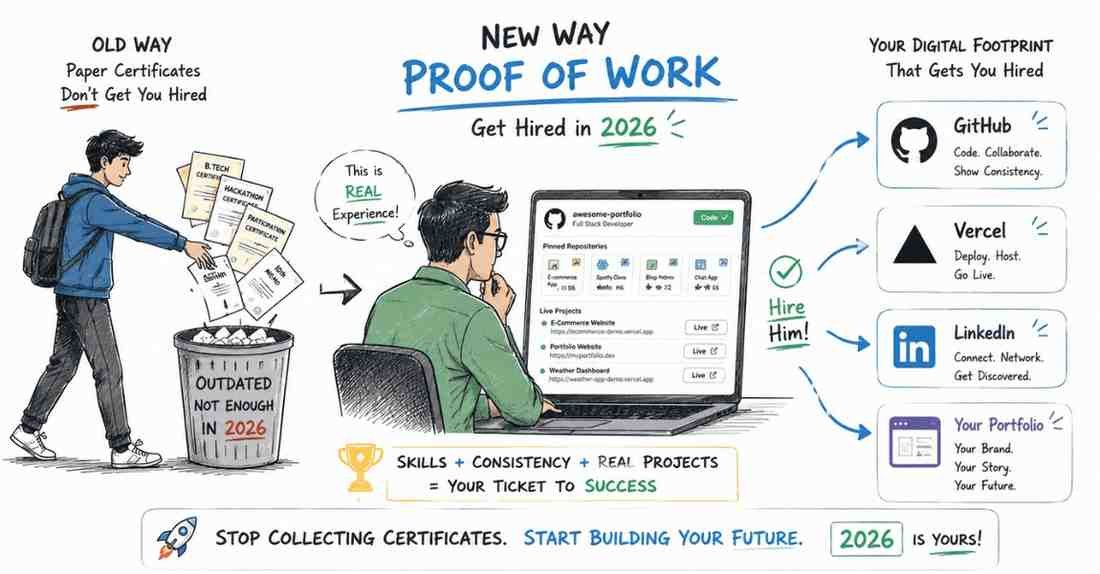
Picture this: You are walking into an interview room. Under your arm is a massive, heavy plastic clear-file. Inside it, carefully arranged in transparent sleeves, are your B.Tech mark sheets, a certificate for participating in a college coding hackathon in 2023, a certificate for an essay writing competition, and your 10th-grade memo.
You proudly place it on the table, expecting the HR manager to look through it and instantly hand you an offer letter.
Let me burst that bubble right now. In 2026, the HR manager does not care about your plastic folder. We are living in an era where AI can write code, generate designs, and analyze data. A piece of paper that says you passed an exam three years ago no longer proves you can do the job today.
Today, the tech industry operates on a new currency: Proof of Work. If you say you are a Full Stack Developer, where is the live website I can click on? If you say you are a Data Analyst, where is the live dashboard I can interact with? If you say you are a UI/UX Designer, where is the prototype I can tap through on my phone?
If your projects only exist inside a zipped folder on your local laptop, they do not exist. In this comprehensive guide, I am going to show you how to transition from a “student with a degree” to a “professional with a portfolio.” We are going to master GitHub, learn how to host projects live for free, and build a digital footprint that makes recruiters desperately want to hire you.
Chapter 1: The Death of the Certificate and the Rise of "Proof of Work"
Why did the IT industry shift away from relying on degrees?
Ten years ago, simply knowing the theory of Java or C++ was enough to get you an entry-level job. Companies would hire you, train you for six months, and then put you on a project. Today, timelines are brutal. Startups and MNCs want freshers who can hit the ground running on day one.
When a recruiter looks at your resume, they give it 6 seconds. In those 6 seconds, if they don’t see clickable links that lead to real, working projects, they assume you only know theory.
What is Proof of Work?
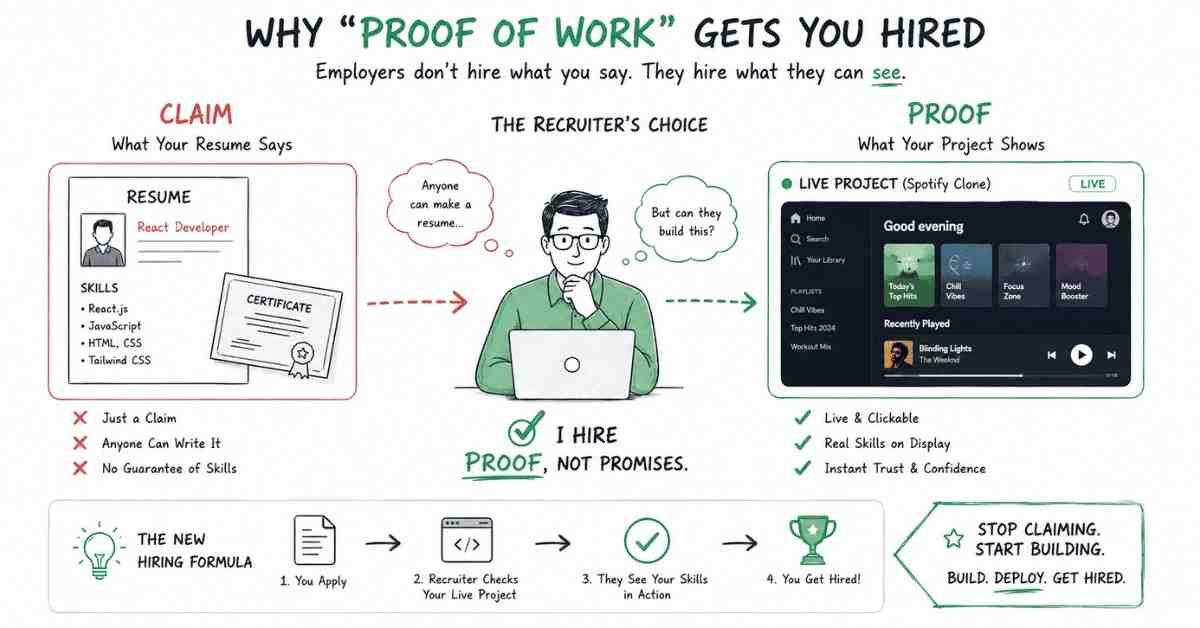
Proof of work is verifiable, public evidence that you can build things. It removes the risk for the employer.
- A resume says: “I know React.js.” (This is a claim).
- Proof of Work says: “Here is a Spotify clone I built using React.js. Click here to play a song.” (This is a fact).
To build this Proof of Work, you need to master two different ecosystems: The Code Repository (GitHub) and the Live Deployment (Vercel/Netlify/Behance). Let’s break them down.
Chapter 2: GitHub – The Developer's Real Resume
If you are applying for any coding role (Frontend, Backend, Full Stack, Cloud, or Data Science), GitHub is your actual resume.
Many freshers create a GitHub account, upload their final year project as one massive block of code on the day before the interview, and never touch it again. When an HR clicks your GitHub link and sees an empty, inactive profile, it is a massive red flag.
Here is how you optimize your GitHub profile to scream “Hire Me.”
1. The "Green Dots" of Consistency
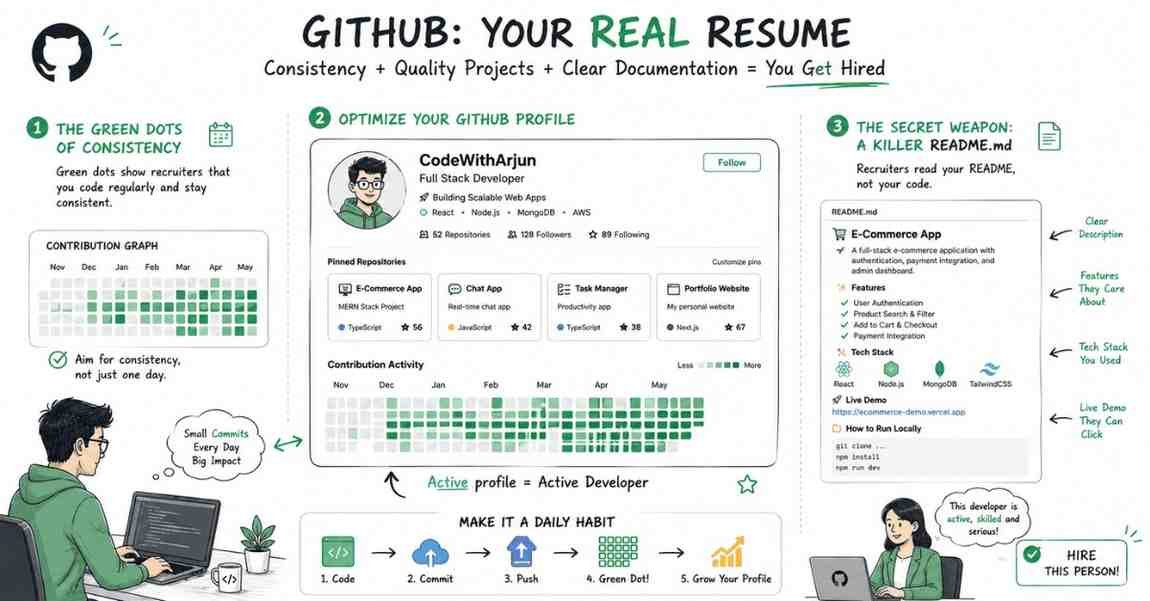
When you go to a GitHub profile, there is a contribution graph at the bottom. It shows a grid of little squares. When you write code and “commit” (save) it to GitHub, that square turns green.
Recruiters and Senior Tech Leads love the green dots. A profile with scattered green dots across 6 months shows that you are a consistent, passionate coder who practices regularly. A profile with zero dots, except for one massive green dot yesterday, shows you just uploaded a zip file to look good for the interview.
Action Step: Stop coding locally. Even if you are just practicing HTML and CSS, or writing basic Python scripts, create a repository and push your code to GitHub every single day. Make those dots green.
2. Pin Your Top 4 Repositories
Your GitHub profile allows you to “Pin” up to 6 repositories (folders containing your projects) to the top of your page. Do not make the recruiter hunt for your best work. Pin your top 3 or 4 projects so they are the very first thing anyone sees.
3. The Secret Weapon: A Killer README.md
This is the most critical part of GitHub. When a recruiter clicks on your project, they are presented with a bunch of code files (index.js, App.css, etc.). HR managers do not read code. Tech leads might, but HRs won’t.
They read the README.md file.
A README is a document attached to your project that explains what the project is, what technologies were used, and how it works. If you do not have a README, your project is useless to a recruiter.
The ChatGPT Prompt for a Perfect README
Don’t know how to write a good README? ChatGPT can do it for you in 10 seconds.
“Act as a Senior Developer writing documentation. I just built a project called [Project Name]. It is a [Short description, e.g., weather application that fetches real-time data]. The tech stack I used is [Insert Tech Stack, e.g., React, TailwindCSS, OpenWeather API]. >
Write a professional README.md file for this GitHub repository. Include the following sections:
- Project Title and a 2-line catchy description.
- A ‘Live Demo’ link placeholder.
- Features (bullet points).
- Tech Stack used.
- Installation instructions (how to run it locally).
Format it beautifully using Markdown.”
Copy the result, paste it into your GitHub repository, and instantly, your project looks like it was built by a senior engineer.
Chapter 3: The "Live Link" Rule (Vercel & Netlify)
Now that your code is on GitHub, we need to address the second half of Proof of Work: The Live Deployment.
If you send a recruiter a GitHub link, they have to download your code, install dependencies, and run it on their local machine just to see what it looks like. Let me tell you a secret: No recruiter has the time or technical patience to run your code locally.
If your project is not live on the internet, it doesn’t count.
Thanks to modern cloud platforms, hosting your web projects is now 100% free and takes exactly three clicks.
Enter Vercel and Netlify
Platforms like Vercel and Netlify are designed for developers to host their frontend and full-stack applications instantly.
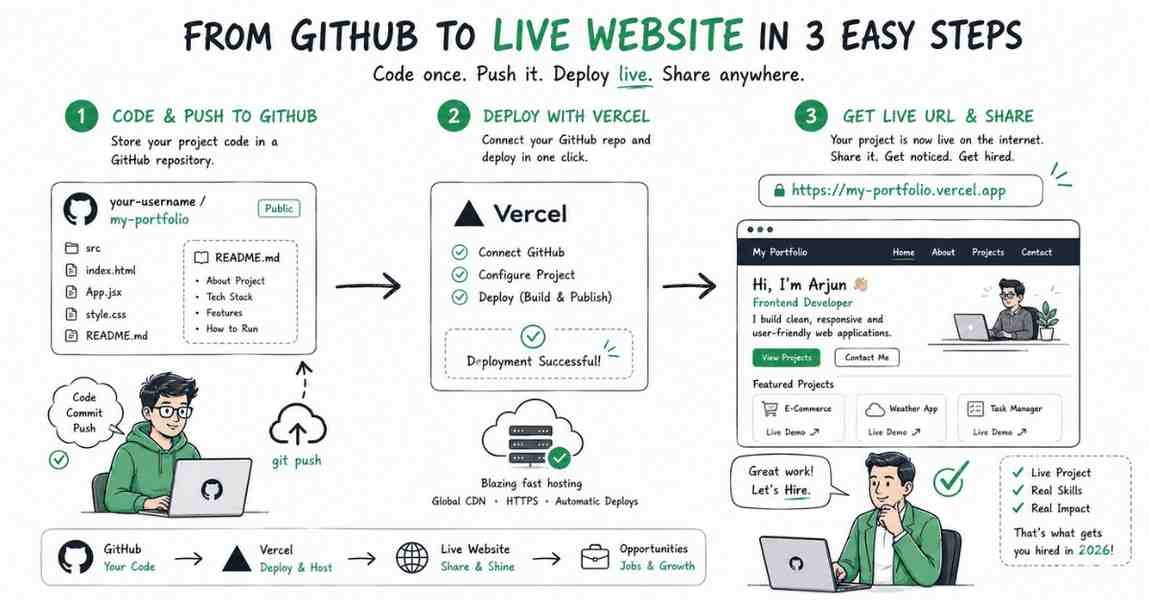
How it works:
- You create a free account on Vercel.
- You click “Add New Project” and connect your GitHub account.
- You select the repository containing your project (e.g., your Spotify Clone).
- You click “Deploy.”
Within 60 seconds, Vercel will take your code and generate a live, clickable, public URL (e.g., https://my-spotify-clone.vercel.app).
The Impact:
You now take this live URL and put it directly on your ATS Resume (Next to the project name) and pin it to the “Featured” section of your LinkedIn profile. Now, when the HR is sipping their coffee and reviewing your resume, they can click the link on their phone or laptop and instantly interact with the beautiful application you built.
That is how you get hired without experience.
Chapter 4: What if I am not a Coder? (Designers & Analysts)
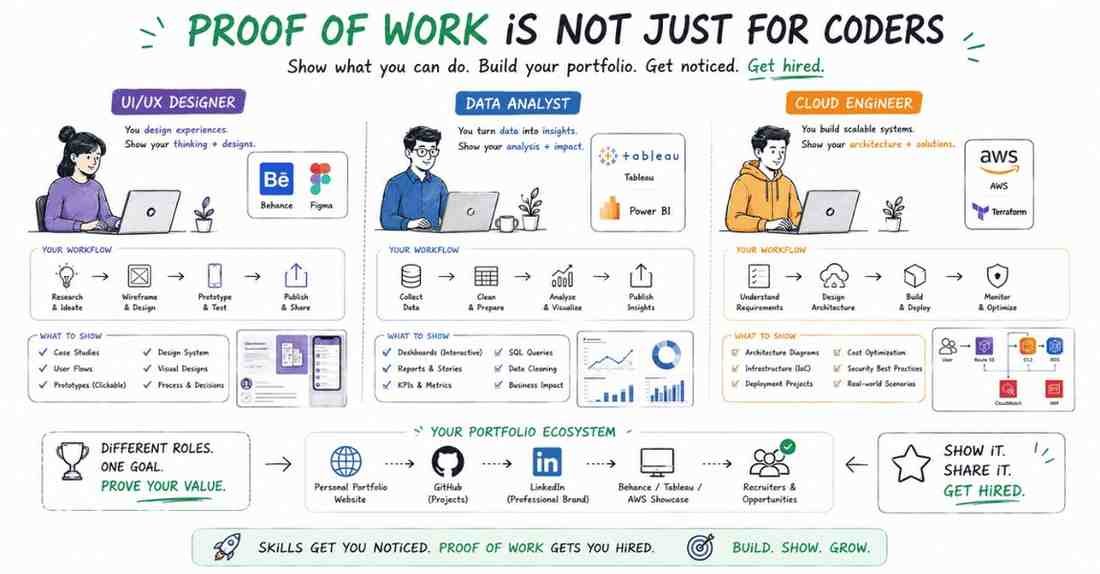
“Proof of Work” is not just for software engineers. It applies to every single high-paying IT role. If you are targeting non-coding roles, your platforms change, but the strategy remains exactly the same.
For UI/UX Designers: Behance & Figma
If you are applying for design roles, your GitHub is Behance or Dribbble.
Do not send HRs a Google Drive link with PNG images of your app designs. It looks highly unprofessional.
Create a Behance portfolio. Upload your entire design process not just the final screens. Show your wireframes, your user research, your typography choices, and your color palettes.
Even better? Include a Figma Prototype Link. Let the recruiter click the buttons on your design and watch the screens transition exactly like a real app.
For Data Analysts: NovyPro & Tableau Public
If you are analyzing data, do not just put “SQL and PowerBI” on your resume and expect a job.
Take a raw dataset (you can find thousands on Kaggle.com), clean it, analyze it, and build an interactive dashboard.
Host that dashboard publicly on platforms like Tableau Public or NovyPro (for PowerBI). Put the live dashboard link on your resume. When the HR clicks it, they should be able to play with the filters, adjust the dates, and watch your graphs update in real-time.
For Cloud Engineers: Architecture Diagrams & Tech Blogs
You can’t “host” a cloud infrastructure in the same way you host a website. For Cloud and Cyber Security freshers, your proof of work comes from Documentation.
Build a complex architecture on AWS (using free tier). Take screenshots. Draw an architecture diagram using a tool like Draw.io. Write a detailed technical blog post on Medium or Hashnode explaining why you set it up that way, how you secured it, and what happens if a server fails. Link that blog post in your resume.
Chapter 5: The Ultimate Move – Your Personal Portfolio Website
If you want to completely destroy your competition and be in the top 1% of applicants, you need to bring everything together into one centralized hub: Your Personal Portfolio Website.
Instead of handing an HR a resume with 10 scattered links, you hand them one link: www.yourname.com (or a free Vercel domain like yourname.vercel.app).
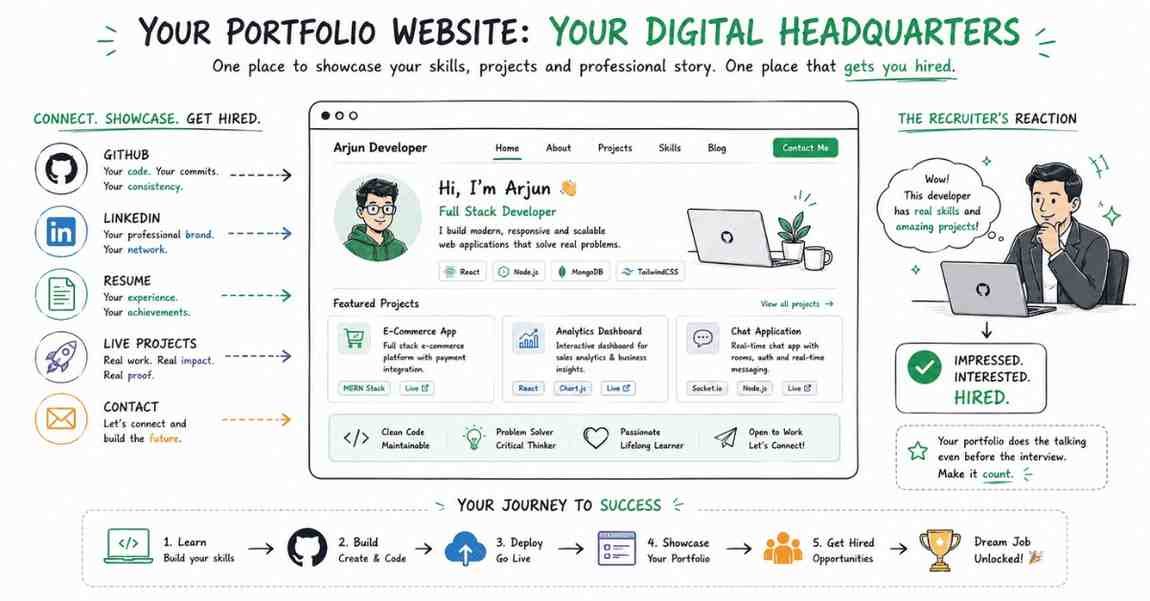
Your portfolio website is your digital headquarters.
What should be on your personal website?
- Hero Section: A clean, professional photo of you, your name, and a punchy headline (e.g., “Hi, I’m Ashok. I build scalable full-stack applications.”).
- About Me: A short, engaging paragraph about your skills and passion for tech.
- Projects Section (The Core): Grids displaying screenshots of your top 3 projects. Each project must have a short description, the tech stack used, a link to the GitHub repo, and a link to the Live Demo.
- Resume Button: A clear, visible button to download your ATS-friendly PDF resume.
- Contact/Footer: Your LinkedIn link, GitHub link, and a direct email button.
How to build it if you don’t know Web Dev?
If you are a web developer, you should code this from scratch. It is literally your first project.
If you are a Data Analyst, HR Tech professional, or Cyber Security enthusiast who doesn’t know HTML/CSS, don’t worry. You do not need to code it.
- Canva Websites: You can build a beautiful, scrollable portfolio site using Canva for free and publish it directly.
- Notion: Many top professionals build their portfolios on Notion. It is clean, minimalist, and extremely easy to organize.
- GitHub Pages / Ready-Made Templates: You can download free HTML portfolio templates from sites like HTML5UP, change the text to your name, and host it for free.
The platform doesn’t matter. The presentation of your “Proof of Work” does.
Conclusion: Your Action Plan for Today
The era of begging for a job with a piece of paper is over. The era of proving your skills on the internet has begun.
Let’s review your action plan to build an undeniable Proof of Work:
- Clean up your GitHub: Add profile pictures, write a bio, and pin your best repositories.
- Write README files: Use the ChatGPT prompt provided to generate professional documentation for your projects.
- Get the Green Dots: Start pushing small bits of code or documentation every day to show consistency.
- Deploy Live: Take your top two projects and host them live on Vercel, Netlify, Behance, or Tableau Public.
- Update your Resume: Put those live, clickable links right next to your project descriptions on your ATS Resume and LinkedIn Featured section.
When an HR manager looks at your profile and sees live projects they can interact with, you are no longer a “risk.” You are a proven asset.
What’s Next in the “Job Ready 2026” Series?
Now you have a flawless ATS Resume. Your Naukri and LinkedIn profiles are highly optimized. You have a portfolio filled with live links and Proof of Work. Your foundation is incredibly strong.
But what if you are tired of competing with 10,000 other freshers on Naukri and LinkedIn?
In Episode 5: Hidden Tech Job Platforms, we are moving from defense to offense. I am going to reveal the top 3 hidden recruitment platforms where startups and product companies hire freshers directly. No middlemen, no massive crowds just you chatting directly with the CEOs and founders on WhatsApp-style apps.
👉 Action Item for Today: Open your GitHub, run the ChatGPT prompt to create a README for your best project, and deploy it to Vercel.
If you feel like you don’t have any strong projects to showcase, it’s time to upgrade your skills. Frontlines Edutech specializes in project-based learning. Whether it is Web Development, Cloud, or UI/UX, we ensure you graduate not just with a certificate, but with an entire portfolio of live, deployable projects. See you in the next post!