
CRO Specialist Career Guide
Table of Contents
What is Conversion Rate Optimization and Why It Matters
Conversion Rate Optimization (CRO) is the systematic process of increasing the percentage of website visitors who complete desired actions—purchases, sign-ups, downloads, or form submissions. While most marketers focus on driving more traffic, CRO specialists maximize the value of existing traffic by removing friction and improving user experience.
Consider this: A website getting 10,000 visitors monthly with 2% conversion rate generates 200 conversions. By improving conversion rate to 4% through CRO, that same traffic produces 400 conversions—doubling results without spending a single rupee on advertising. This multiplication effect makes CRO specialists incredibly valuable to businesses.
CRO specialists are equal parts analyst, psychologist, and experimenter. They use data to understand how users behave, psychology to understand why users behave that way, and experimentation to test which changes improve outcomes. They analyze heatmaps, conduct user research, design A/B tests, optimize landing pages, simplify checkout flows, and systematically improve every touchpoint in the conversion funnel.
In 2026, as digital advertising costs rise across India, maximizing ROI from existing traffic becomes critical. CRO specialists who can reliably increase conversion rates by 20-50% command premium salaries and high demand across e-commerce, SaaS, fintech, and lead generation industries.
Top 10 Conversion Rate Optimization Techniques
1. A/B Testing (Split Testing):
Testing two versions of a page element to determine which performs better.
What to Test:
- Headlines and value propositions
- Call-to-action button text, color, size, placement
- Page layouts and element ordering
- Images vs. videos
- Form field numbers and labels
- Pricing display and messaging
Best Practices:
- Test one variable at a time for clear attribution
- Run tests until reaching statistical significance (typically 95% confidence)
- Test with sufficient sample size (minimum 100 conversions per variation)
Consider seasonality and timing when interpreting results
2. Social Proof and Trust Signals:
Displaying evidence that others trust and use your product reduces purchase anxiety.
Effective Social Proof:
- Customer testimonials with photos and full names
- Review ratings and number of reviews
- “X customers bought this today” notifications
- Trust badges (SSL certificates, payment security, money-back guarantees)
- Media mentions and press logos
- Case studies showing real results
- User-generated content (customer photos, videos)
Implementation: Display prominently near decision points (add-to-cart buttons, checkout pages, sign-up forms).
3. Page Speed Optimization:
Every second of load time reduces conversions significantly.
Speed Improvements:
- Compress images without quality loss
- Minimize JavaScript and CSS files
- Enable browser caching
- Use Content Delivery Networks (CDN)
- Optimize server response time
- Implement lazy loading for images below fold
Target: Pages should load in under 3 seconds on mobile connections common in India.
4. Mobile Experience Optimization:
Over 70% of Indian traffic comes from mobile devices.
Mobile CRO Essentials:
- Responsive design adapting to all screen sizes
- Large, tappable buttons (minimum 44×44 pixels)
- Simplified navigation for small screens
- Minimal typing required in forms
- Click-to-call buttons for immediate contact
Mobile-optimized checkout with digital wallets (UPI, Paytm, Google Pay)
5. Checkout Flow Optimization:
Where most e-commerce conversions are won or lost.
Checkout Best Practices:
- Guest checkout option (don’t force account creation)
- Minimal form fields (every field reduces completion rate)
- Progress indicators showing steps remaining
- Multiple payment options (cards, UPI, wallets, COD for India)
- Clear error messages that help users fix issues
- Display total cost early (no surprise fees at final step)
- Exit-intent popups offering discounts to abandoners
- Fast, focused checkout without distractions
Impact: HubSpot study found reducing form fields from 4 to 3 increased conversions up to 50%.
6. Optimize Lead-Capture Forms:
Balance information gathering with conversion maximization.
Form Optimization Tactics:
- Keep it simple: Fewer fields = higher completion
- A/B test form length: Find optimal field count for your audience
- Multi-step forms: Breaking into steps improves perceived ease
- Smart defaults: Pre-fill what you can (location, etc.)
- Clear value exchange: Explain what they get for submitting
Prominent submit button: Make it stand out visually
7. Compelling Headlines and Value Propositions:
Users decide within 3-8 seconds whether to stay or bounce.
Effective Headlines:
- Lead with primary benefit, not features
- Be specific with numbers and outcomes
- Address customer pain points directly
- Use clear, simple language (avoid jargon)
- Create urgency when authentic
Example: “Learn Digital Marketing in 12 Weeks and Land ₹6+ Lakh Job” beats “Comprehensive Digital Marketing Course.”
8. Clear Calls-to-Action (CTAs):
Direct users explicitly toward desired action.
CTA Best Practices:
- Action-oriented text: “Start Free Trial” vs. “Submit”
- Contrasting colors: Button should stand out from background
- Above the fold: Primary CTA visible without scrolling
- White space: Give CTAs breathing room
- Urgency: “Get 40% Off Today” vs. “Buy Now”
Single primary CTA: Don’t offer too many options simultaneously
9.Live Chat and Support:
Answering questions in real-time reduces abandonment.
Live Chat Benefits:
- Answer pre-purchase questions immediately
- Provide personalized product recommendations
- Overcome objections in real-time
- Reduce cart abandonment at checkout
- Collect feedback about friction points
Implementation: Deploy on high-traffic pages (product pages, pricing, checkout) during peak hours.
10. User Behavior Analysis:
Understanding how users actually interact with your site reveals optimization opportunities.
Analysis Tools and Techniques:
- Heatmaps: See where users click, move mouse, and how far they scroll
- Session recordings: Watch actual user journeys to identify confusion
- Form analytics: Discover which fields cause drop-offs
- Funnel analysis: Pinpoint exact steps where users abandon
- User testing: Watch real people use your site while thinking aloud
These insights reveal problems you’d never notice in analytics alone.
Essential CRO Specialist Skills
Research and Analysis Skills
Quantitative Analysis: Interpreting analytics data, calculating conversion rates, identifying trends, statistical understanding for valid A/B tests.
Qualitative Research: Conducting user interviews, analyzing session recordings, interpreting heatmaps, understanding user frustrations.
User Psychology: Understanding cognitive biases (social proof, scarcity, anchoring), motivation triggers, and decision-making processes.
Data Interpretation: Distinguishing correlation from causation, recognizing when sample sizes are insufficient, understanding statistical significance.
Technical Skills
A/B Testing Tools: Proficiency in Google Optimize, VWO, Optimizely, Convert, or Unbounce for running experiments.
Analytics Platforms: Deep Google Analytics knowledge, understanding of event tracking, goal setting, and funnel analysis.
Heatmap and Session Recording Tools: Using Hotjar, Crazy Egg, FullStory, or Microsoft Clarity to understand user behavior.
Basic HTML/CSS: Understanding web page structure to implement tests and make recommendations to developers.
Form Analytics: Tools like Formisimo or Hotjar form analytics to diagnose form completion issues.
UX and Design Understanding
User Experience Principles: Understanding information architecture, visual hierarchy, cognitive load, and usability best practices.
Landing Page Design: Knowing what makes landing pages convert—clear value props, strong CTAs, minimal distractions, trust signals.
Mobile UX: Understanding mobile-specific design considerations and mobile user behavior patterns.
Copywriting: Writing compelling headlines, benefit-focused copy, and persuasive CTAs that drive action.
CRO Specialist Salary in India
CRO specialists command strong salaries due to direct revenue impact:
Experience-Based Salary Ranges
- Junior CRO Analyst (0-2 years): ₹4-7 lakhs per year
- CRO Specialist (2-5 years): ₹7-14 lakhs per year
- Senior CRO Specialist (5-8 years): ₹14-22 lakhs per year
- CRO Manager (8+ years): ₹22-35 lakhs per year
Industry Variations
- E-commerce: ₹6-28 lakhs (high transaction volume, immediate revenue impact)
- SaaS: ₹7-30 lakhs (focus on trial-to-paid conversion, onboarding)
- Fintech: ₹8-32 lakhs (application completion, account opening flows)
- Lead Generation: ₹6-24 lakhs (form completion, consultation bookings)
- Agencies: ₹5-22 lakhs (working across multiple client industries)
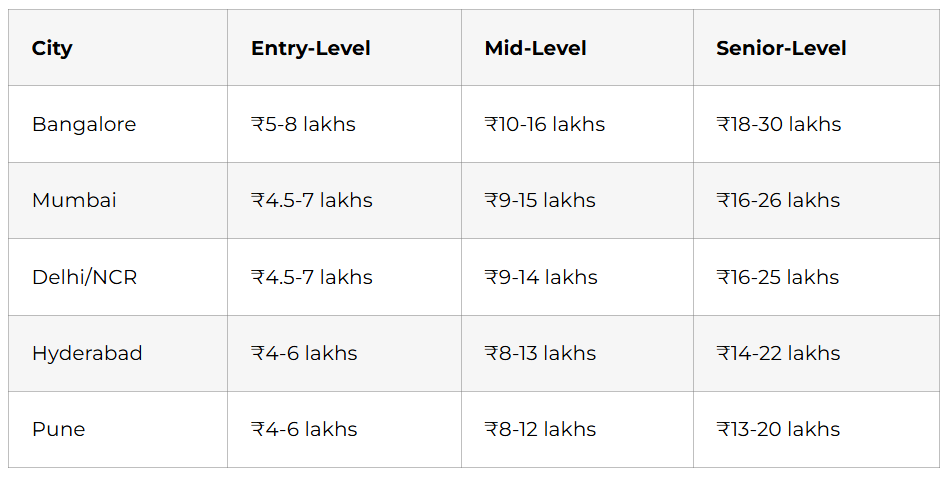
City-Wise Comparison
Freelance CRO Consulting
Experienced CRO specialists charge premium rates:
- ₹3,000-8,000 per hour for consulting
- ₹50,000-2,00,000 per project for conversion audits
- ₹1,00,000-4,00,000 monthly retainers for ongoing optimization
- 10-20% of revenue lift as performance bonus (common arrangement)
How to Become a CRO Specialist
Month 1-2: Learn CRO Fundamentals
Study Core Concepts:
- Take free CRO courses from CXL Institute, Udemy, or Coursera
- Read books: “Don’t Make Me Think” by Steve Krug, “Influence” by Robert Cialdini
- Study conversion optimization blogs (CXL, Unbounce, VWO, ConversionXL)
- Understand user psychology and cognitive biases
Learn Statistical Basics:
- Understand sample size calculations
- Learn statistical significance testing
- Know when results are trustworthy vs. random chance
- Study common A/B testing mistakes
Month 3-4: Master CRO Tools
Get Hands-On with Tools:
- Set up Google Analytics on personal website or test site
- Create free Hotjar account and install on site
- Practice with Google Optimize (free A/B testing tool)
- Explore Microsoft Clarity for session recordings (free)
- Learn form analytics tools
Practice Analysis:
- Analyze your own website or blog with heatmaps
- Watch session recordings to understand user behavior
- Set up conversion funnels in Google Analytics
- Practice identifying optimization opportunities
Month 4-6: Build Portfolio Projects
Project 1: Conversion Audit
- Choose real website (e-commerce, SaaS, lead gen)
- Conduct comprehensive conversion audit
- Analyze user flows, identify friction points
- Create detailed report with prioritized recommendations
- Include before/after mockups showing improvements
Project 2: A/B Test Case Study
- Run real A/B test on your site or client site
- Document hypothesis, test design, execution
- Analyze results with statistical rigor
- Present learnings and recommendations
- Show measurable improvement (even 10-20% lift is valuable)
Project 3: Landing Page Optimization
- Take poorly-converting landing page
- Redesign applying CRO best practices
- Explain each change with CRO principles
- Show before/after designs
- Estimate expected conversion rate improvement
Month 6+: Gain Experience and Apply
Get Practical Experience:
- Offer free conversion audits to small businesses
- Manage CRO for friend’s/family’s e-commerce store
- Volunteer for nonprofit organization’s website optimization
- Take CRO-focused internship at agency or e-commerce company
Job Titles to Search:
- CRO Specialist
- Conversion Rate Optimization Analyst
- Growth Analyst (CRO focus)
- Landing Page Optimizer
- UX Optimizer
Resume Strategy:
- Lead with measurable results (“Increased conversion rate from 2.1% to 3.4%”)
- Highlight tool proficiency
- Showcase statistical knowledge
- Include portfolio link
- Demonstrate both analytical and creative thinking
Career Growth Path for CRO Specialists
Year 0-2: Junior CRO Analyst
Assist with test execution, analyze data, create reports, conduct user research. Expected salary: ₹4-7 lakhs.
Year 2-5: CRO Specialist
Own A/B testing roadmap, conduct audits, design experiments, present findings to stakeholders. Expected salary: ₹7-14 lakhs.
Year 5-8: Senior CRO Specialist
Lead optimization strategy, manage junior analysts, collaborate with product and engineering teams. Expected salary: ₹14-22 lakhs.
Year 8+: CRO Manager/Head of Optimization
Shape company-wide experimentation culture, manage optimization team, report to CMO or VP Growth. Expected salary: ₹22-35 lakhs.
Alternative paths:
- Product Manager: Transition into product management
- Growth Manager: Expand from CRO to full growth stack
- UX Research: Focus on user research and experience design
- CRO Consultant: Advise multiple companies as independent expert
FAQs: CRO Specialist Career
Q: Do I need design skills to become a CRO specialist?
Basic design understanding helps but isn’t mandatory. You need to recognize good UX and brief designers, not create designs yourself.
Q: Is CRO only for e-commerce?
No. SaaS (trial conversions), fintech (application completions), lead generation (form submissions), and B2B (demo requests) all need CRO.
Q: How long does it take to see CRO results?
A/B tests typically need 2-4 weeks to reach statistical significance. Full CRO programs show measurable impact within 3-6 months.
Q: Can CRO specialists work remotely?
Yes. CRO work is highly digital—analyzing data, running tests, and collaborating online all work remotely.