
ATS Optimization Techniques

Table of Contents
The Secret Language of ATS
Here’s something most job seekers don’t realize: resumes are written for two audiences, not one. First for the robot (ATS), then for the human recruiter. You need to speak both languages.
When you write “managed a team,” you sound professional to a recruiter. But the ATS hears silence. It’s searching for specific keywords like “team leadership,” “people management,” or “staff coordination.” Without those exact words, your resume scores zero on that skill—even if you’re genuinely great at leading teams.reddit+1
This section teaches you to think like the ATS algorithm. Understand what it’s looking for, and you’ll get past the filter.

Step 1: Keyword Research—Your Secret Weapon
Before you rewrite a single line, you need to find the keywords that matter.
How to Extract Keywords from Job Descriptions:
Step A: Collect 3-5 job postings for the role you want. (Even if you’re applying to one specific role, gathering multiple postings helps you understand industry language.)
Step B: Copy each job description into a free text analyzer tool. Use services like:
- Online-Utility.org Text Analyzer
- WordCounter.com
- Or even ChatGPT: “Extract key skills and keywords from this job description”
Step C: Identify keywords that appear in multiple postings—these are gold. They’re the language of your industry.
Example:
If you’re targeting a Digital Marketing Manager role, job descriptions commonly mention:
- “Content strategy” or “content marketing”
- “SEO optimization” or “search engine optimization”
- “Google Analytics” or “analytics”
- “Social media management”
- “Campaign management”
- “Team leadership” or “team management”
- “WordPress”
- “LinkedIn”
These become your keyword list. Now, here’s the crucial part: If these words aren’t in your resume, the ATS won’t find them.
“Want More ATS & Resume Optimization Tips? Explore Frontlines Media’s Expert Guides →”
Step 2: Strategic Keyword Placement
Knowing your keywords isn’t enough—you need to place them strategically so the ATS catches them.
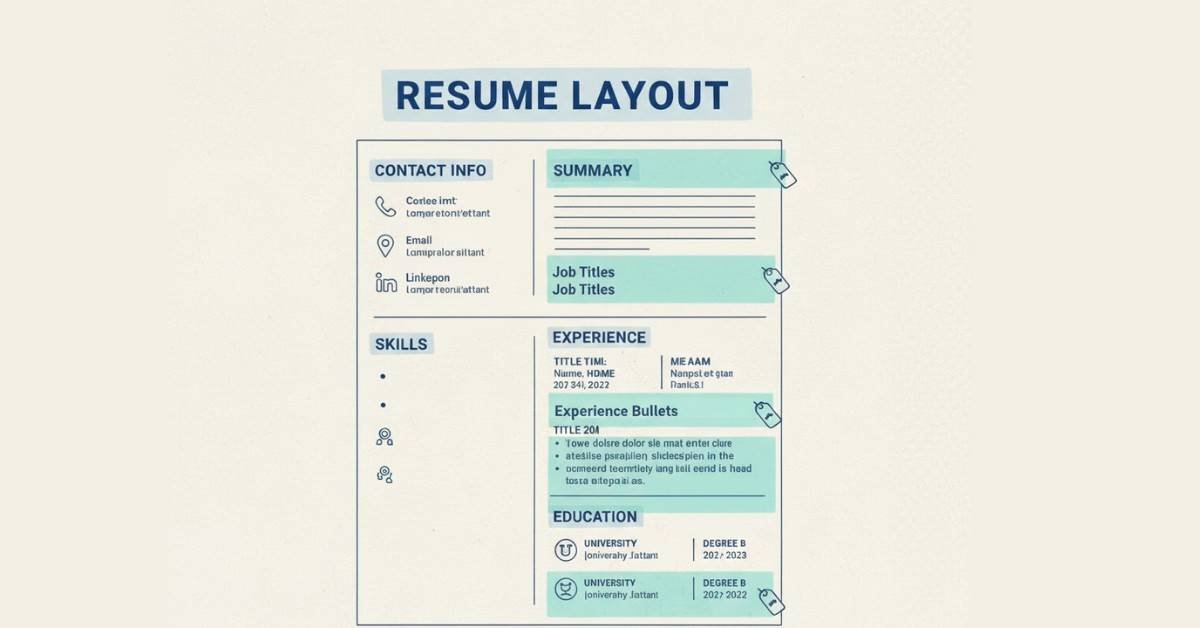
Where to Place Keywords (In Order of Importance):
- Professional Summary (Impact: Very High)
Instead of:
“Passionate marketing professional with experience in digital marketing”
Write:
“Digital Marketing Manager with 4+ years of expertise in SEO optimization, content strategy, and Google Analytics. Proven track record building and leading high-performing marketing teams across SaaS and EdTech sectors.”
See the difference? The second version includes: SEO optimization, content strategy, Google Analytics, marketing teams—all critical keywords. The ATS matches these against the job description immediately.
- Job Titles (Impact: Very High)
Recruiters search for specific job titles. If a job description says “Digital Marketing Manager,” and you worked as a “Marketing Executive,” match the terminology:
Instead of:
Marketing Executive at Company X
Try:
Digital Marketing Manager at Company X
(Or: Digital Marketing Manager | Marketing Executive at Company X)
This doesn’t mean lying—if your role included SEO, content strategy, and team management, that’s a Digital Marketing Manager role. Use the industry-standard title.
- Work Experience Bullets (Impact: High)
Weave keywords naturally into your achievement bullets:
Job Description Asks For: “SEO expertise, content strategy, social media management”
Your Bullet Points Should Include:
- “Developed comprehensive SEO strategy and content marketing calendar, increasing organic traffic by 150%”
- “Led social media management across LinkedIn and Instagram, growing engagement by 85%”
- Skills Section (Impact: High)
This is where you explicitly list keywords:
SEO & Content: SEO optimization, keyword research, on-page optimization, content strategy, content marketing, blog management
Digital Marketing: Google Analytics 4, Google Ads, social media management, campaign management, email marketing
Tools & Platforms: WordPress, Google Search Console, LinkedIn, Canva, Elementor Pro
- Experience Details (Impact: Medium)
Mention tools and technologies you used:
Instead of:
“Created marketing reports”
Write:
“Created marketing performance reports in Google Analytics 4, tracking KPIs and conversion metrics for stakeholder reporting”

Step 3: Using Long-Form and Acronym Versions
Many technical terms have both full and abbreviated versions. Smart ATS optimization uses both:
Problem: If you only write “Google Analytics 4,” you might miss searches for “GA4”
If you only write “GA4,” you might miss searches for “Google Analytics”
Solution: Include both naturally in your resume
“Managed Google Analytics 4 (GA4) implementations across 8 high-traffic properties”
“Experienced in SEO (Search Engine Optimization), keyword research, and on-page optimization”
“Led team using Agile (Agile Methodology) sprint cycles”
This doubles your chances of keyword matching without looking repetitive.jobscan+1
“Boost Your Resume With Job-Ready Skills — Explore Industry-Standard Courses →
Step 4: Keyword Frequency Matters
Here’s an insider tip: ATS algorithms often score based on keyword frequency. If a job description heavily emphasizes “team leadership,” you should mention it multiple times (2-3 times) throughout your resume.
Smart Keyword Frequency:
Mention primary keywords 2-3 times naturally:
- Once in the professional summary
- Once or twice in relevant job experience bullets
- Once in the skills section
Example for “Project Management”:
Professional Summary: “Project management and team coordination across 5+ cross-functional initiatives”
Work Experience: “Directed project management of website redesign, coordinating 8 team members across 3-month timeline”
Skills Section: “Project Management | Agile Project Management | Scrum”
The ATS sees keyword hits for “project management” and ranks you higher.
Important: This should feel natural. Don’t force keywords awkwardly. ATS systems are getting smarter at detecting keyword stuffing. Write naturally, then audit your resume to ensure critical keywords appear appropriately.

Step 5: File Format and Technical Optimization
Here’s where many strong candidates get filtered out: the format.
Best Formats for ATS Compatibility:
- Microsoft Word (.DOCX) – Best Choice
- ATS systems parse Word documents most effectively
- Maintains formatting in most systems
- Use for applications through job portals
- PDF (.PDF) – Use Carefully
- Some ATS systems struggle with PDFs
- Graphics-heavy or image-based PDFs fail completely
- Use only if specifically requested or submitting directly to companies
- When saving as PDF, use “Save As PDF” from Word, not “Print to PDF”
- Avoid These Formats:
- Google Docs (doesn’t translate well when downloaded)
- Pages (Apple format—not compatible)
- Any file with custom formatting or graphics
Critical Technical Tips:
Spacing & Margins:
- Use 1-inch margins on all sides (critical for ATS parsing)
- Single-spacing between lines
- Double line break between sections
- This ensures the ATS can “read” your content without extraction errors
Font Selection:
- Use standard, compatible fonts: Arial, Calibri, or Times New Roman
- Font size: 10-12 pt
- Black text, white background
- No fancy fonts—they often don’t convert during parsing
Avoid These Formatting Errors:
- ❌ Text boxes or columns (ATS reads top-to-bottom, left-to-right only)
- ❌ Graphics, charts, or images (can’t be parsed)
- ❌ Headers and footers (may not extract properly)
- ❌ Hyperlinks that don’t display full URLs
- ❌ Tables with complex cell structures
- ❌ Colored text (except maybe dark blue headings)
- ❌ Special characters or symbols (use standard punctuation)
File Name Best Practice:
- ✅ FirstName_LastName_Resume.docx
- ❌ Resume_Final_V3_ACTUAL_Final2.docx
- ❌ resume.pdf
- ❌ MyResume_2024.docx
A clear file name helps both ATS systems and recruiters locate your document.sgsconsulting+1
Step 6: Testing Your ATS Compatibility
Before submitting, test your resume against actual ATS systems:
Free ATS Testing Tools:
- Jobscan.co (paste resume and job description, get match percentage and improvements)
- ResumeWorded.com (free ATS audit and suggestions)
- Parsedot.com (see how ATS extracts your information)
- CV Parser (shows what an ATS actually “sees”)
What to Do:
- Paste your resume
- Paste a target job description
- Review your match percentage
- Fix the flagged issues (usually missing keywords or formatting problems)
- Retest until you hit 70%+ match
Even if you don’t achieve 100%, reaching 70-80% match indicates the ATS will pass your resume to recruiters
Step 7: Common ATS Killers (Avoid These)
Content Errors:
- Using “Responsible for…” (passive voice, low ATS score)
- No quantified results (metrics are keywords too)
- Generic descriptions like “Worked with” or “Helped with”
- Missing standard job titles
Technical Errors:
- Using Tables (ATS can’t parse them)
- Fancy formatting or graphics
- Headers/footers with important information
- Saving as the wrong file format
- Using symbols instead of words (@ for “at,” & for “and”)
Strategic Errors:
- Resume uses “Communication” but job asks for “Stakeholder Management”
- Resume doesn’t mention required technical tools
- Missing specific keywords that appear 3+ times in job description
- Skills section doesn’t match job requirements
Fix these, and you’ll move past most ATS filters.
Real-World Example: Before & After ATS Optimization
BEFORE (Low ATS Score):
Marketing Professional
2020-Present | New Delhi
- Responsible for digital marketing initiatives
- Worked on social media strategy
- Helped create content
- Good at Google Analytics
- Experienced with WordPress and design
Skills: Marketing, Digital Skills, Creative Writing
Problems:
- ❌ No specific job title
- ❌ Passive voice (“Responsible for,” “Worked on,” “Helped”)
- ❌ No quantified results
- ❌ Vague skill descriptions
- ❌ Keywords from job description missing
AFTER (High ATS Score):
Digital Marketing Manager
March 2020 – Present | New Delhi, Delhi
- Developed comprehensive digital marketing strategy and content calendar, increasing organic traffic by 150% year-over-year
- Led social media management across LinkedIn, Instagram, and Facebook, growing followers by 85% and engagement rate by 120%
- Managed Google Analytics 4 implementations and conversion tracking, providing weekly performance reports to leadership
- Optimized WordPress site architecture and navigation, improving user experience and reducing bounce rate by 35%
- Trained and coordinated 2-member marketing team on SEO best practices and content optimization
Skills:
Digital Marketing: Digital marketing strategy, social media management, campaign management, content marketing
SEO & Content: SEO optimization, keyword research, content strategy, blog management, on-page optimization
Tools & Platforms: Google Analytics 4, Google Ads, WordPress, LinkedIn, Elementor, Canva, Google Search Console
Improvements:
- ✅ Specific job title (Digital Marketing Manager)
- ✅ Active voice with action verbs
- ✅ Quantified results (150%, 85%, 120%, 35%)
- ✅ Tool names and keywords explicitly mentioned
- ✅ Organized skills section with categories
- ✅ Strong keyword alignment
The “After” version would score 80%+ on ATS systems scanning for digital marketing roles.
Your ATS Optimization Checklist
Before submitting any application:
- ✓ Does your resume include keywords from the job description? (Identify 5-10 key terms)
- ✓ Are keywords naturally woven into professional summary, titles, and bullets?
- ✓ Did you use both long-form and acronym versions where applicable?
- ✓ Are all achievements quantified with numbers or percentages?
- ✓ Did you use active voice with strong action verbs?
- ✓ Is your file in .DOCX format with standard formatting?
- ✓ Are margins 1-inch and font a standard type (10-12 pt)?
- ✓ Does your job title match industry terminology for the role?
- ✓ Did you test your resume on an ATS scanner?
- ✓ Is your resume 1-2 pages without graphics or complex formatting?
Continue to: Learn how to write compelling work experience bullets that pass both ATS and recruiter review.
Learn more: Explore Frontlines Edutech’s Resume Optimization Workshop for personalized feedback on your resume and ATS improvements.