
Stop Saying "Hi Bro." The Professional Way to Get LinkedIn Referrals in 2026
Table of Contents
Introduction
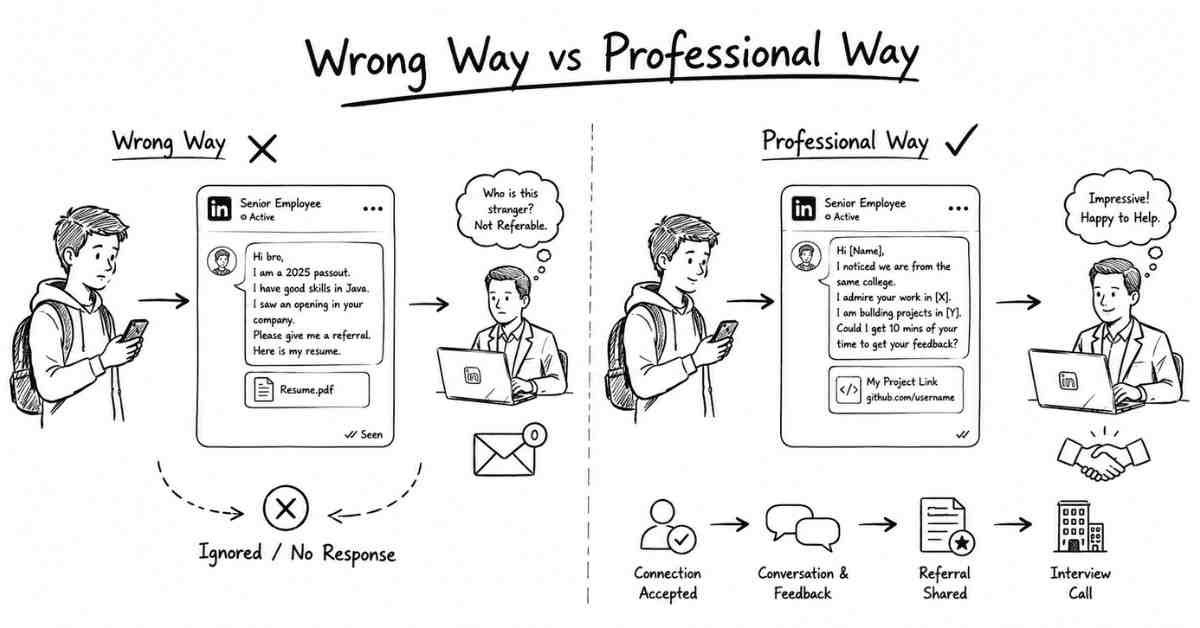
Let’s talk about the most abused, misunderstood, and poorly executed strategy in the entire job-hunting universe: The LinkedIn Referral.
Right now, there is a fresher sitting in their room, opening LinkedIn, searching for “Software Engineer at Amazon,” clicking “Connect,” and immediately sending this exact message:
“Hi bro. I am a 2025 passout. I have good skills in Java. I saw an opening in your company. Please give me a referral. Here is my resume.”
Then they sit back, confident that they just “networked.”
A day goes by. A week goes by. The message is left on “Read.” The fresher gets frustrated and thinks, “Nobody wants to help freshers. Corporate people are so arrogant.”
Let me give you a harsh reality check: They are not arrogant. You are just asking the wrong way.
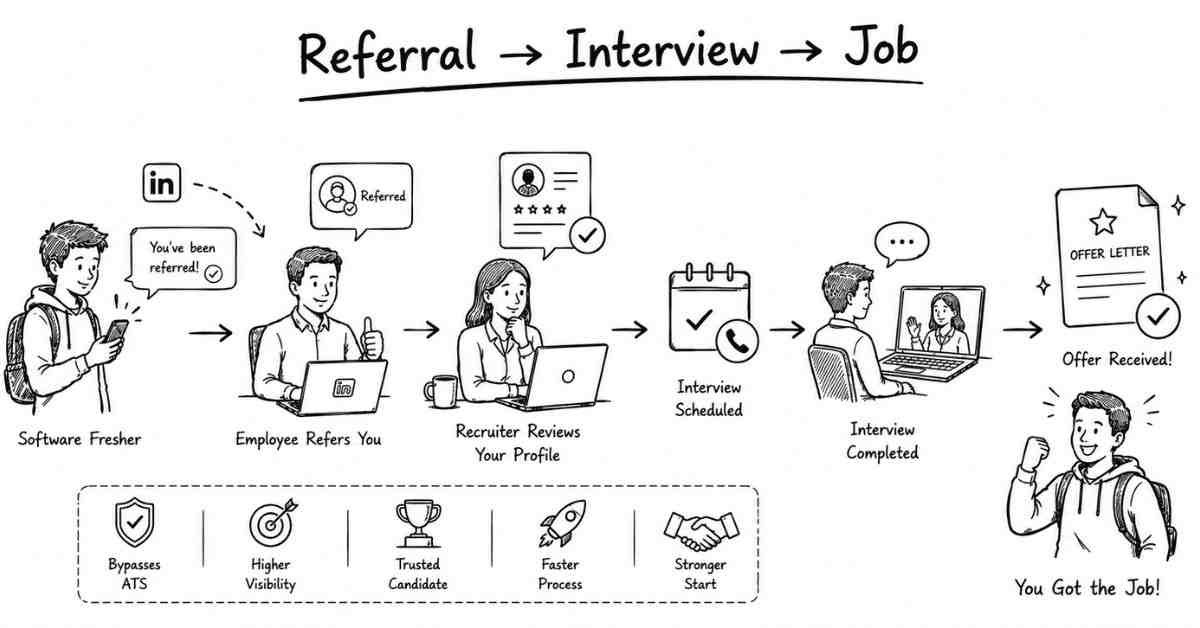
In the corporate world, an internal referral is the golden ticket. If a current employee refers you, your resume completely bypasses the ATS robot (which we discussed in Episode 1). You jump straight to the top of the HR manager’s pile. Because referrals are so powerful, they are not handed out to strangers who say “Hi bro.”
In this comprehensive guide, I am going to teach you the psychology behind why people give referrals, who you should actually be targeting, and the exact 3-step message script that will make senior professionals want to refer you.
Let’s fix your networking strategy.
Chapter 1: The Psychology of a Referral (Why Strangers Say No)
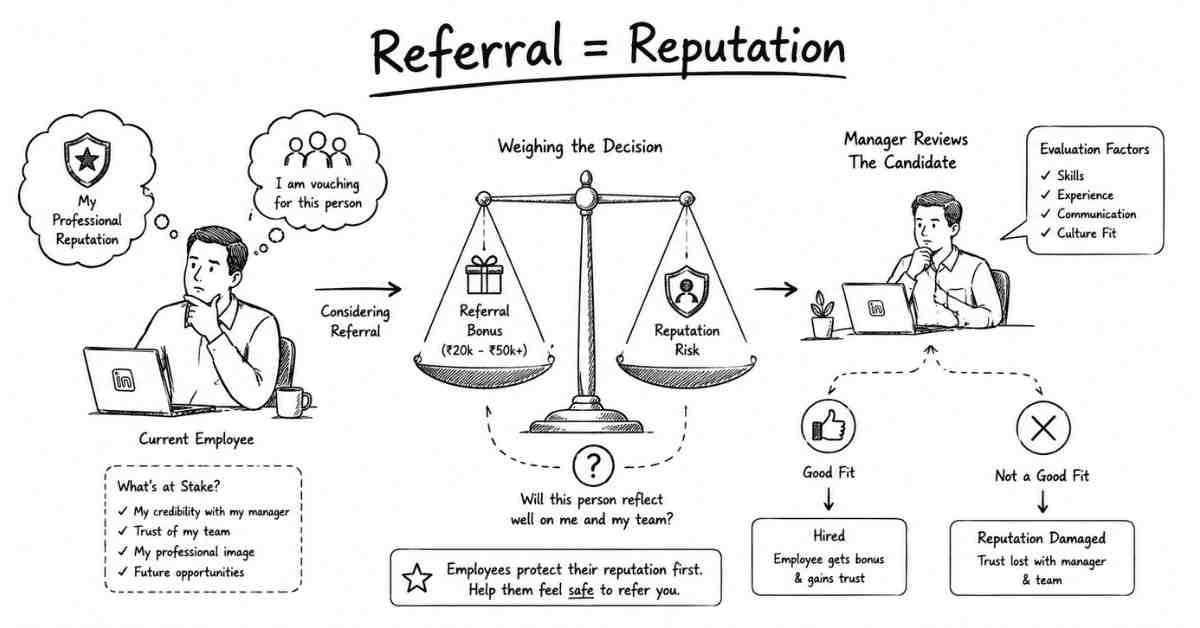
Before you ask someone for a favor, you must put yourself in their shoes.
Why do companies have referral programs in the first place? Because it saves the HR team time and money. If an employee recommends someone, the company assumes that the candidate is trustworthy, skilled, and a good cultural fit.
To encourage this, companies offer a Referral Bonus. If an employee refers you, and you get hired and stay for 6 months, that employee might get a bonus of ₹20,000 to ₹50,000 (or more, depending on the role).
“Wait, Ashok!” you might be thinking. “If they get paid, shouldn’t they be begging to refer me?”
No. Because it comes with a massive Reputation Risk.
When a Senior Cloud Engineer or a Data Analyst refers you, they are essentially telling their boss: “I vouch for this person. I put my professional reputation on the line to say they are good.” If they refer a stranger who turns out to have zero skills, a terrible resume, or who behaves unprofessionally in the interview, the employee looks like a fool. Their boss will lose trust in them.
No employee is going to risk their hard-earned corporate reputation for a stranger who sent them a one-line message on LinkedIn. To get a referral, you must first eliminate their risk. You must prove you are a safe bet.
Chapter 2: The Target (Who You Should Actually Ask)
The biggest mistake freshers make is asking the wrong people.
- Do not ask the CEO: They are too busy and don’t handle entry-level hiring.
- Do not ask the HR: HR’s job is to recruit. A referral is supposed to come from outside the HR department to validate you.
You need to ask Industry Peers or Alumni.
If you are looking for a UI/UX Designer role, you must ask a current UI/UX Designer at that company. If you are looking for a Workday HCM Consultant role, ask a current Workday Consultant. They understand your skills, they know what the technical interview will be like, and their referral carries the most weight with their specific team manager.
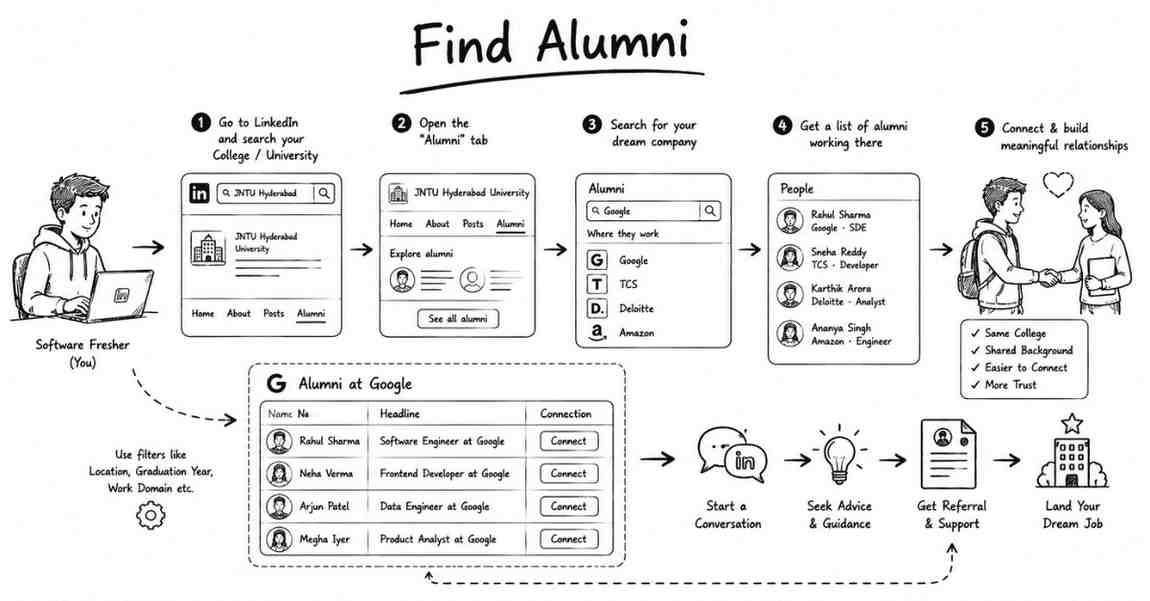
The Ultimate Hack: The LinkedIn Alumni Tool
The absolute best person to ask for a referral is someone who graduated from your exact college. Humans have a natural psychological bias toward people who share their background.
Here is how you find them:
- Go to the LinkedIn search bar and type in your College/University name.
- Click on the official college page.
- Click on the “Alumni” tab.
- You will see a search bar specifically for your college’s alumni. Type in the company you want to work for (e.g., “TCS”, “Google”, “Deloitte”).
- Scroll down. You now have a list of people who walked the same halls as you, sat in the same classrooms as you, and are now working at your dream company.
These people have a soft corner for their juniors. This is your target list.
Chapter 3: The "Value First" Approach (The Bait and Switch)
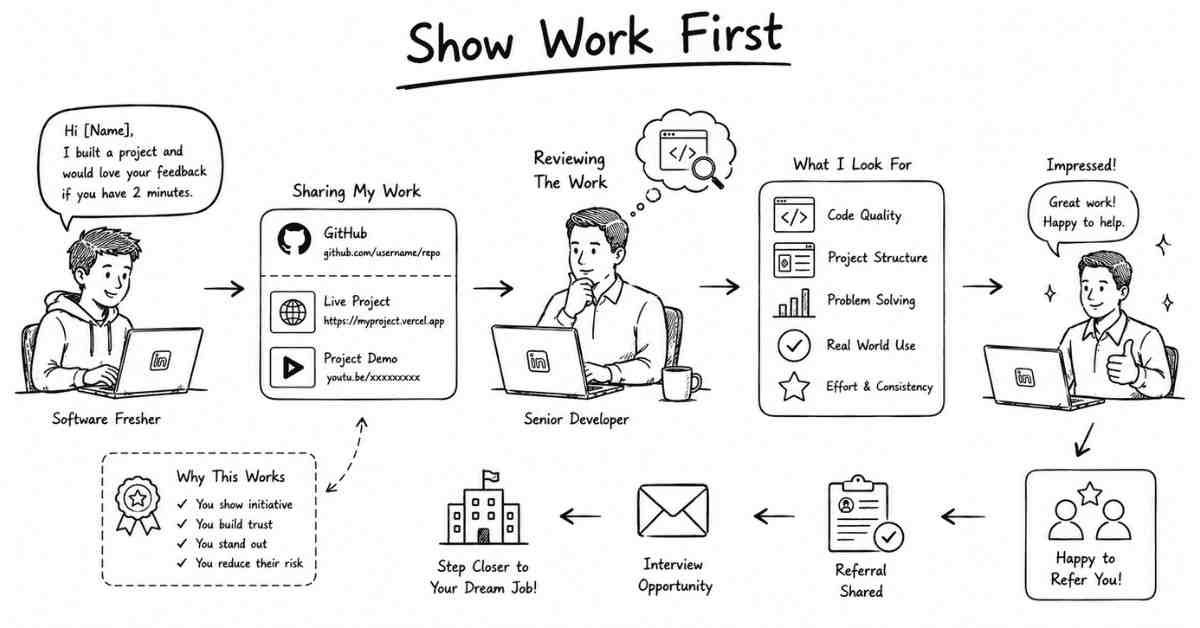
Now that you have your target list, how do you approach them?
You do not ask for a job. You do not ask for a referral.
If you ask for a job on the first message, you are a beggar. If you ask for feedback on your work, you are a professional seeking mentorship. This is the “Bait and Switch” (in a positive, professional way).
Instead of asking them to risk their reputation by referring you, you ask them for 2 minutes of their time to review your “Proof of Work” (your GitHub, your Live Vercel link, your PowerBI Dashboard).
The Psychological Trick:
When you ask a Senior Full Stack Developer to review your React.js project, two things happen:
- They feel respected. You are treating them as an expert.
- They actually look at your code. If your code is clean, they instantly realize you are highly skilled.
Once they see your project and realize you are talented, they will often be the ones to say, “Hey, your project is great. Are you looking for a job? We have an opening on my team.” You didn’t have to beg for a referral. You proved your worth, and the referral happened organically.
Chapter 4: The 3-Step Message Framework (With Templates)
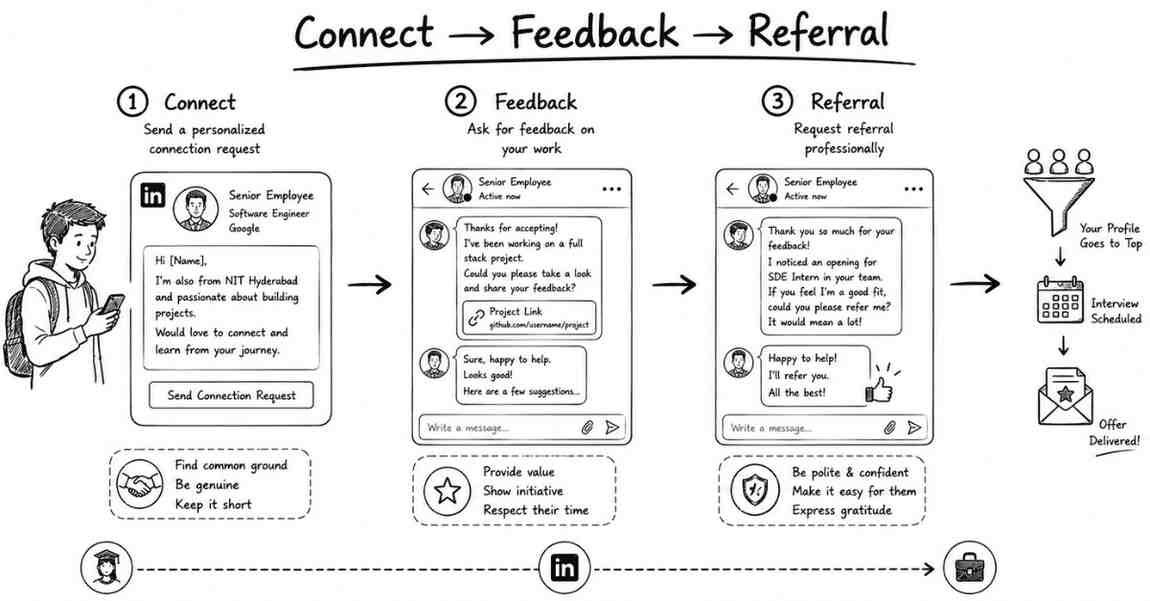
Networking is a slow burn. It takes patience. You must execute this in a 3-step sequence over the course of a week.
Step 1: The Icebreaker (The Connection Request)
When you click “Connect” on LinkedIn, ALWAYS click “Add a Note.” You have 300 characters to make a first impression.
Template 1A: For College Alumni
“Hi [Name], I am currently a final-year student at [College Name]. I saw you are working as a [Role] at [Company], which is incredibly inspiring. I’d love to connect and follow your professional journey!”
Template 1B: For Industry Peers (Strangers)
“Hi [Name], I have been following your work in Data Analytics, and I really admire the insights your team at [Company] is producing. I am a junior analyst currently building out my portfolio. Would love to connect and learn from your feed!”
Goal: Get them to accept the request. That’s it. No links. No resumes.
Step 2: The Feedback Ask (Wait 2-3 Days)
Once they accept your request, wait a couple of days. Engage with their posts if they have any. Then, send a message asking for a micro-favor: Feedback on a specific, live project.
Template 2 (The Feedback Message):
*”Hi [Name], thanks for connecting! As a junior [Role, e.g., Cyber Security Analyst], I am currently trying to bridge the gap between academic theory and industry standards.
I recently completed a mock Vulnerability Assessment Report [or mention your specific project] and hosted it here: [Insert Live Link].
I know you are incredibly busy, but if you ever have 2 spare minutes, I would heavily value your expert feedback on whether my methodology aligns with what companies like [Their Company] actually look for. No pressure at all!”*
Goal: Prove you are highly skilled by forcing them to look at your live project link. You are removing all pressure. You are not asking for a job, so their guard drops down.
Step 3: The Pivot (The Referral Ask)
If your project is good, they will usually reply with some positive feedback. “Hey, this looks great. Maybe adjust the UI a bit, but solid effort.” Now, you have built rapport. You have proven you are not a scammer and not a desperate fresher. You have proven your skills. Now you ask for the referral.
Template 3 (The Soft Referral Ask):
*”Thank you so much for taking the time to look at it, [Name]. I really appreciate the feedback and will definitely implement those changes.
Actually, the reason I originally reached out is that I saw an opening for a Junior [Role] on your company’s careers page (Job ID: 12345). Since you have now seen my code/work standards, would you be comfortable submitting an internal referral for me?
If you are not comfortable or if your company policy doesn’t allow it, I completely understand! Either way, I appreciate your guidance.”*
Why this works: You have given them an “out.” By saying “If you are not comfortable, I completely understand,” you remove the awkwardness. Because you have already proven your skills in Step 2, the reputation risk for them is gone. 8 out of 10 times, they will say, “Sure, send me your resume and email ID.”
Chapter 5: The ChatGPT Referral Prompt
If you want to customize these messages for a highly specific role (like Cloud Engineering, Business Analysis, or Digital Marketing), let’s use AI to craft the perfect 3-step sequence.
Open ChatGPT and copy-paste this prompt:
“Act as an expert Corporate Networker and Career Coach. I want to build a relationship with a Senior [Insert Target Role, e.g., Cloud Architect] working at [Insert Target Company, e.g., AWS] on LinkedIn, with the ultimate goal of getting a job referral.
Here is my profile:
My Role: [Insert Your Role, e.g., Junior Cloud Engineer]
My Proof of Work: [Insert Project, e.g., I built a highly available 3-tier web architecture on AWS and documented the entire process on a Medium blog].
Please write a 3-Step LinkedIn message sequence for me:
- A 300-character Connection Request Note (The Icebreaker).
- A follow-up message asking for technical feedback on my specific project (The Feedback Ask).
- A final message asking if they would be comfortable referring me for an open entry-level role (The Soft Ask).
Tone guidelines: Highly professional, humble, respectful of their time. Do not use generic words like ‘passionate.’ Do not sound desperate.”
Review the output, tweak it to sound like your natural voice, and start your outreach campaign.
Chapter 6: Handling the Responses (Yes, No, and Silence)
When you start executing this strategy with 10 to 15 professionals, you will encounter three types of responses. Here is how to handle them professionally:
Scenario A: The “Yes”
They say, “Sure, send me your resume.” Your Action: Send them your ATS-Friendly PDF Resume (which you built in Episode 1). Do not send a Canva design. Send them the Job ID link from their company website. Thank them politely. Do not message them every day asking “Bro, any update?” Wait two weeks before asking for a status check.
Scenario B: The “No” or “Not Right Now”
They might say, “Your project is good, but our team is on a hiring freeze right now,” or “I only refer people I have personally worked with.”
Your Action: Do not get angry. Reply with: “I completely understand! Thank you again for your time and feedback. I will keep following your work.” You just left a great impression. 6 months down the line, when they are hiring, they might remember you.
Scenario C: The Silence
You send the feedback message, and they read it but never reply.
Your Action: Let it go. Do not double-text. Do not send question marks (“???”). They are likely busy with their own corporate deadlines. Move on to the next person on your target list. Networking is a numbers game played with high-quality bait.
Conclusion: Your Action Plan for Today
Networking is not about begging for favors; it is about exchanging value. You are bringing your fresh, updated technical skills to the table, and they are bringing their corporate access.
Let’s review your action plan to hack the referral system:
- Stop sending blank connection requests. Always add a tailored note.
- Use the Alumni Tool. Find people from your college working in your target companies. They are your warmest leads.
- Lead with Proof of Work. Never ask for a job first. Ask for feedback on your live project link.
- Remove the Pressure. When you finally ask for the referral, give them a polite way to say no.
By treating senior employees with respect and proving your competence upfront, you bypass the HR portals entirely and unlock the VIP backdoor to the tech industry.
What’s Next in the “Job Ready 2026” Series?
At this point in our series, you have an ATS resume, an optimized Naukri/LinkedIn profile, a live portfolio, and you know how to cold email and get referrals.
Your phone is going to start ringing. HRs are going to start scheduling interviews.
Are you actually ready to face a technical panel? Can you answer complex coding, data, or architecture questions under pressure?
In Episode 9: ChatGPT Technical Mock Interviewer, we are moving into Phase 3: Cracking the Boss. I am going to give you a secret “Mega-Prompt” that will transform ChatGPT into a ruthless, strict Senior Technical Manager. It will ask you live questions, wait for your answers, and grade you out of 10.
👉 Action Item for Today: Go to the LinkedIn Alumni tool. Find 3 seniors working in your target role. Send them the “Template 1” connection request today.
If you are hesitant to ask a senior for feedback because your projects are too basic, it is time to build something robust. At Frontlines Edutech, we focus on building complex, industry-grade projects that will make any Senior Developer pause and say, “Wow, this fresher knows what they are doing.” See you in the next post!