
The VIP Backdoor: How to Cold Email HRs and Startup Founders for Direct Jobs
Table of Contents
Introduction
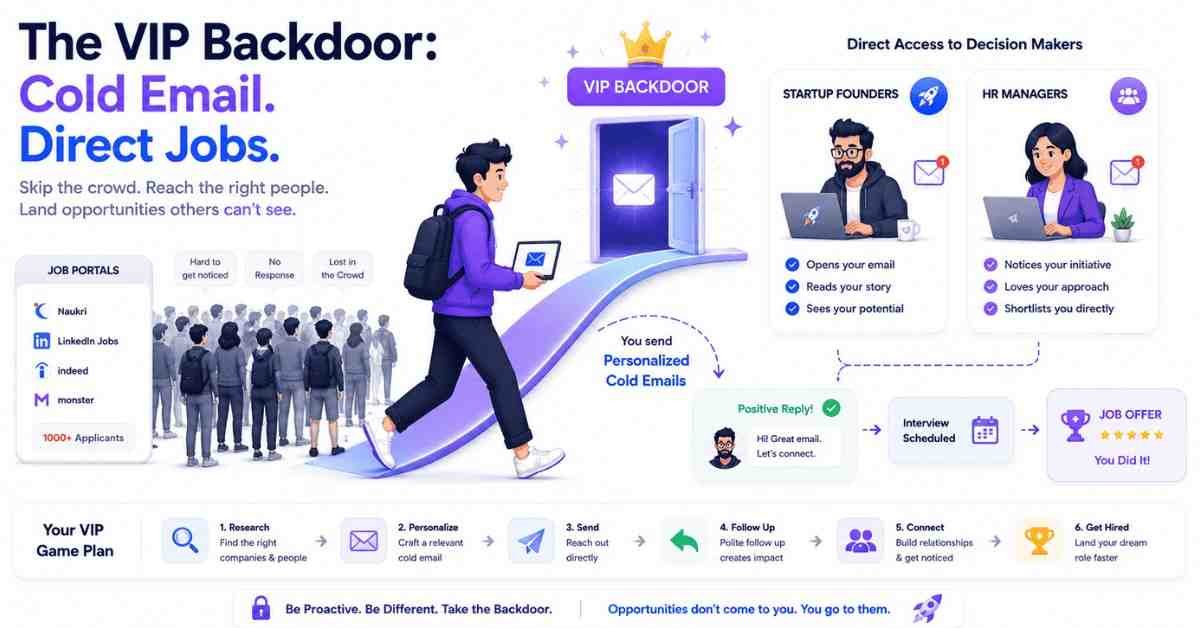
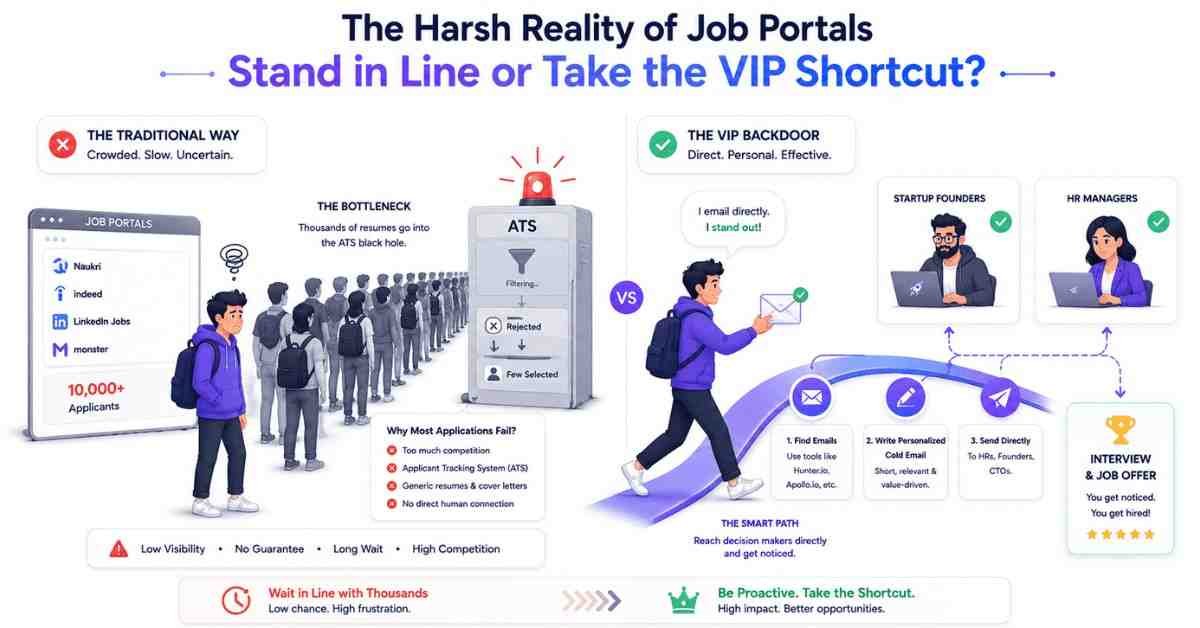
The traditional job hunt is like standing outside a popular nightclub. There is a massive, winding line around the block. You are standing in the cold with 10,000 other people holding your resume, waiting for the bouncer (the Applicant Tracking System) to hopefully let you in.
Most freshers spend their entire job hunt standing in this line. They click “Apply” on a portal and then practice a religion I call “Submit and Pray.” They submit the application and pray to God that an HR manager calls them back.
But what if I told you there is a VIP backdoor?
What if you could bypass the 10,000 people standing in line, walk right up to the club owner (the CEO) or the manager (the HR), tap them on the shoulder, and show them exactly why they need you?
In the corporate world, this VIP backdoor is called Cold Emailing.
A cold email is when you send a direct, uninvited message to a decision-maker’s personal work inbox. It sounds intimidating. Many freshers ask me, “Ashok, isn’t that rude? Won’t they get angry?” The answer is no. If you write a 500-word essay begging for a job, yes, they will delete it. But if you write a sharp, 4-line email that solves their hiring problem instantly, they will respect your hustle, and they will interview you.
In this comprehensive guide, I am going to teach you the most aggressive and effective job-hunting strategy in existence. We will learn how to hunt down secret email addresses, write subject lines that guarantee opens, and use the 4-Line Cold Email Formula.
Chapter 1: The Treasure Hunt (How to Find Email Addresses)
You cannot send a cold email to info@company.com or careers@startup.com. Those are general inboxes. They are black holes managed by automated bots or interns. You will never get a reply.
You need to email the decision-maker directly.
- If it is a large company (MNC), you need to email the Talent Acquisition Specialist or HR Manager.
- If it is a startup (under 50 employees), you need to email the Founder, Co-Founder, or CTO.
How do you find their private work emails? You use free digital sleuthing tools.
Tool 1: Hunter.io
Hunter.io is a search engine specifically for finding professional email addresses.
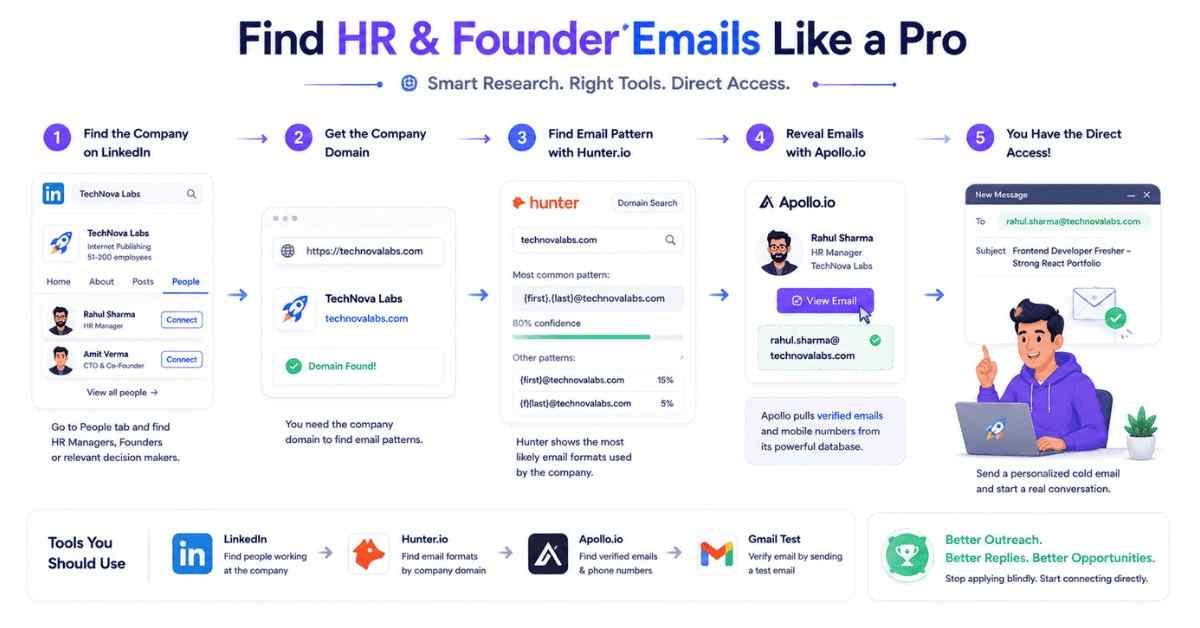
- Go to LinkedIn and search for the company you want to work for.
- Look at their “People” tab and find the name of the HR Manager or CTO (e.g., “Rahul Sharma, HR Head”).
- Go to Hunter.io and type in the company’s website domain (e.g., swiggy.in or cred.club).
- Hunter will show you the exact email format the company uses. For example, it might show that 80% of emails at this company follow the pattern {first}.{last}@company.com.
- Now you know Rahul Sharma’s email is almost certainly rahul.sharma@company.com.
Tool 2: Apollo.io or Clearbit
Apollo.io offers a free Chrome extension that integrates directly with LinkedIn.
When you view the LinkedIn profile of an HR manager, Apollo adds a little button to their profile that says “View Email Address.” Click it, and it pulls the verified work email from their database. It is incredibly powerful.
The Guessing Method (When Tools Fail)
If the tools don’t give you the exact email, you can guess it using Gmail.
Open Gmail, hit “Compose,” and type out the most common corporate email patterns in the “To” field:
- rahul@company.com
- rahul.sharma@company.com
- rsharma@company.com
- rahul.s@company.com
Hover your mouse over each typed email address. If the email is connected to a Google Workspace account, a little profile picture or contact card will pop up when you hover over the correct one!
Chapter 2: The 70% Open Rate Subject Lines
You found the CEO’s email. Great. Now you face the biggest hurdle: The Inbox Scan.
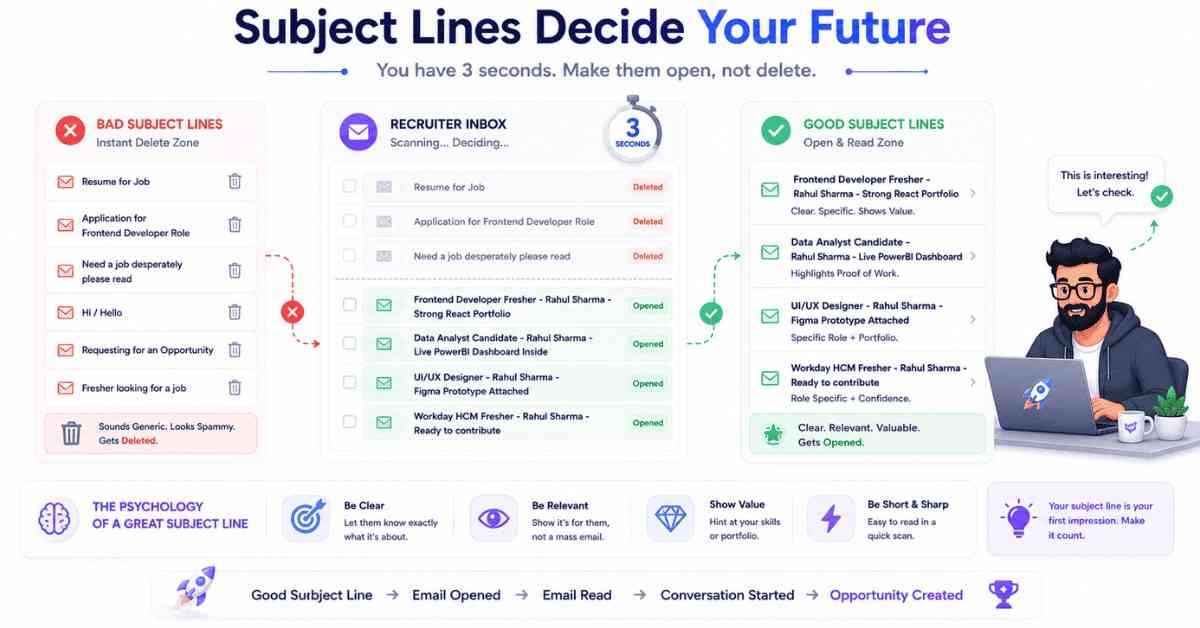
A startup founder or HR manager receives between 100 to 200 emails every single day. When they open their inbox, they scan the subject lines for 3 seconds. If your subject line looks like spam, looks desperate, or looks boring, they will hit the “Delete” icon without ever reading your brilliant email.
The Classic Fresher Mistakes:
- ❌ Resume for Job (Too vague)
- ❌ Application for Frontend Developer Role (Looks like an automated portal email)
- ❌ Need a job desperately please read (Screams desperation and lack of professionalism)
The Psychology of a Great Subject Line:
A great subject line is short, clear, and highlights your value. It must clearly state who you are, what you want, and hint at your Proof of Work.
The Best Subject Lines for Freshers (Copy These):
- ✅ Frontend Developer Fresher – [Your Name] – Strong React Portfolio
- ✅ Data Analyst Candidate – [Your Name] – Live PowerBI Dashboard Inside
- ✅ UI/UX Designer – [Your Name] – Figma Prototype Attached
- ✅ Workday HCM Fresher – [Your Name] – Ready to contribute
Why these work: When the HR scans their inbox, they instantly know exactly what the email is about. It doesn’t look like a marketing email, and the words “Live Dashboard” or “Strong Portfolio” spark curiosity. They will click it.
Chapter 3: The 4-Line Cold Email Formula
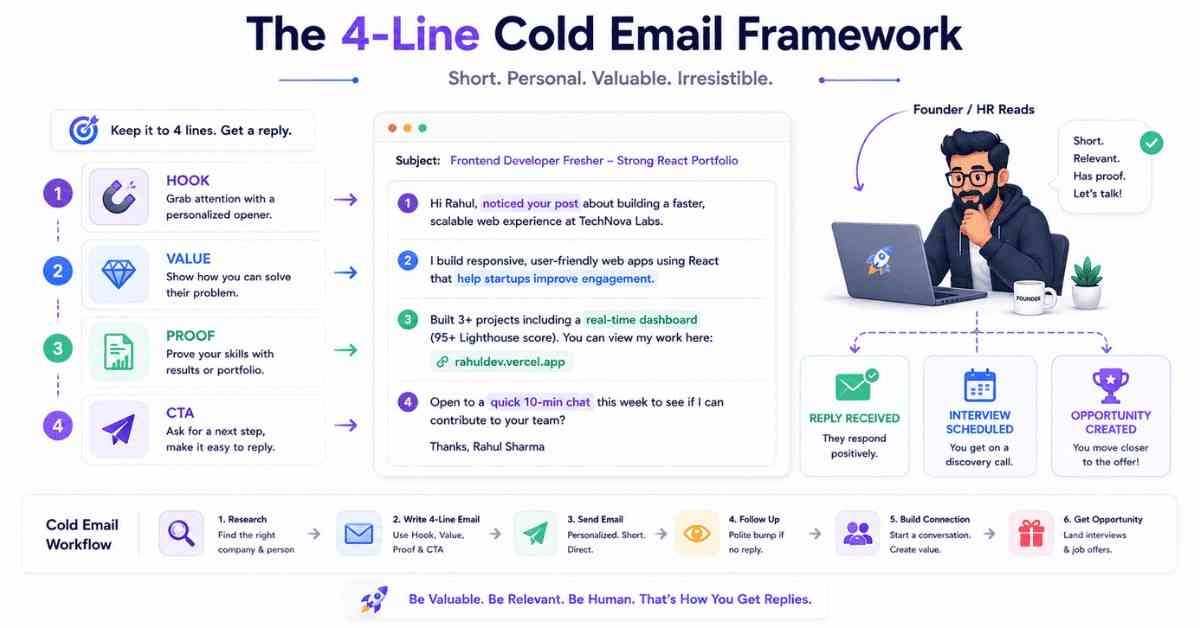
You have their email. They opened it because of your great subject line. Now, you have exactly 5 seconds of their attention.
If they open your email and see a massive, 500-word block of text detailing your childhood passion for computers, your college GPA, and your deep desire to work for their prestigious company… they will close it. Nobody has time to read an essay.
A cold email must be ruthlessly efficient. It must follow the strict 4-Line Formula:
- Line 1: The Hook (Who you are and why you are emailing).
- Line 2: The Value (Your specific tech stack and skills).
- Line 3: The Proof (The live link to your project/portfolio).
- Line 4: The Soft CTA (A low-friction call to action).
No “Respected Sir/Madam.” No “I am a hardworking student.” Just pure, unadulterated value.
Chapter 4: The Cold Email Templates (Copy & Paste)
Here are the exact templates you should use. I have customized them based on who you are emailing.
Template 1: Emailing an HR Manager at an established tech company.
(Use this when there is a known job opening, but you want to bypass the portal).
Subject: Frontend Developer Fresher – [Your Name] – Strong Portfolio
Body:
Hi [HR Name],
I saw your open role for a Junior Frontend Developer and wanted to reach out directly.
I am a fresher specializing in the MERN stack (React.js, Node.js, Express, MongoDB) with a focus on writing clean, scalable code.
Rather than just sending a resume, I wanted to share a live E-Commerce application I recently built and deployed so you can see my coding standards firsthand: [Insert Live Vercel/Netlify Link].
My resume is attached for your reference. I would love the opportunity to hop on a quick 10-minute call to discuss how I can contribute to your frontend team.
Best regards,
[Your Name]
[Your LinkedIn URL]
[Your Phone Number]
Template 2: Emailing a Startup Founder/CEO
(Startups love hustlers. You can use a slightly more aggressive, confident tone here, even if they haven’t officially posted a job).
Subject: Data Analyst – [Your Name] – Built a sales dashboard for [Company Name]
Body:
Hi [Founder Name],
I have been following [Company Name]’s growth and am highly impressed by your recent expansion into [mention something they recently did, e.g., the Tier-2 market].
I am a Data Analyst skilled in Python, SQL, and PowerBI. I noticed your team is scaling fast, which means your data infrastructure is likely getting heavier.
To show what I can do, I used public datasets to build a sample live Sales Tracking Dashboard that is relevant to your industry. You can interact with it here: [Insert Live Dashboard Link].
I am looking for a full-time role and am ready to contribute from day one. Do you have 10 minutes next week for a quick chat?
Best,
[Your Name]
[Your Portfolio Link]
Template 3: The ChatGPT Customizer Prompt
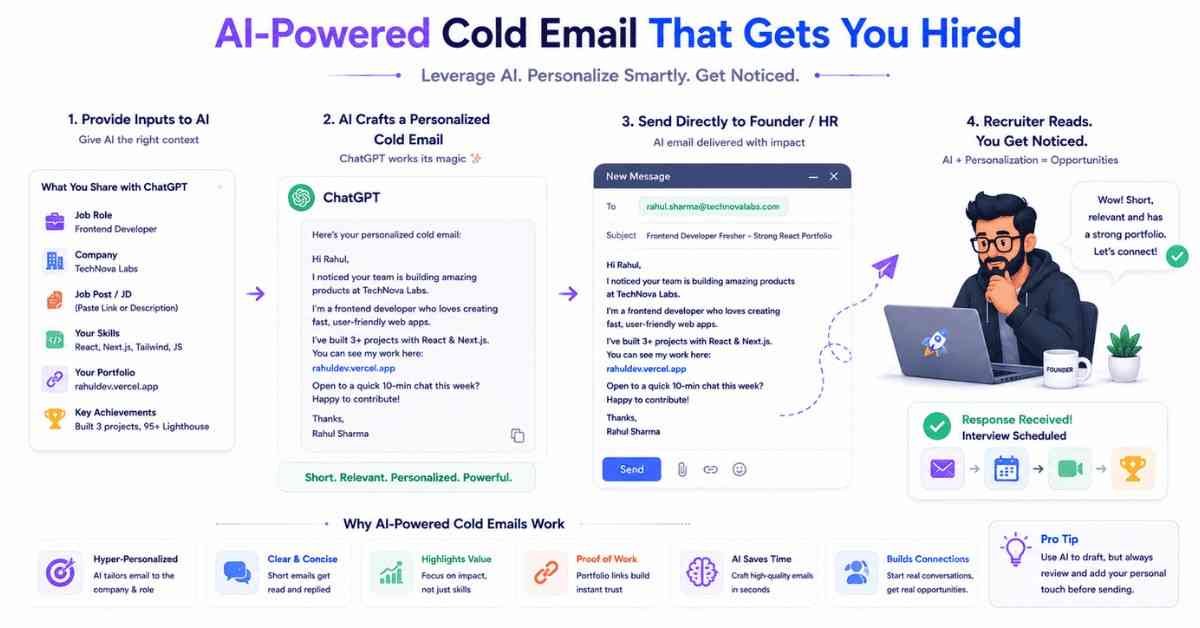
If you want to create a completely unique email tailored to your specific niche (like Cyber Security, Cloud Computing, or HR Tech), use this ChatGPT prompt.
Open ChatGPT and paste this:
“Act as an expert B2B Copywriter and Tech Recruiter. I want to send a Cold Email to the [Insert Title, e.g., CTO] of a company called [Insert Company Name].
My Role: [Insert Role, e.g., Cyber Security Analyst]
My Skills: [Insert Skills, e.g., Penetration Testing, Network Security, Kali Linux]
My Proof of Work: [Insert Project, e.g., A documented vulnerability assessment report hosted on my portfolio]
Write a 4-line cold email using the Hook, Value, Proof, and Soft CTA framework. The email must be under 120 words. Tone: Confident, highly professional, direct. Do not use desperate language or words like ‘passionate,’ ‘seeking,’ or ‘kindly.’ Give me 3 options for high-open-rate subject lines.”
Chapter 5: The Magic is in the Follow-Up
Chapter 6: The Golden Rules of Cold Emailing
Here is a reality check about cold emailing: You will probably not get a reply to your first email.
Founders and HR managers are incredibly busy. They might open your email, think “Wow, this kid is good,” get distracted by a phone call, and completely forget to reply. This happens 80% of the time.
If you send one email and give up, you lose. The true magic of cold emailing lies in the Follow-Up.
You must send a gentle, polite follow-up email. It bumps your name back to the top of their inbox and shows that you are persistent and genuinely interested in their company.
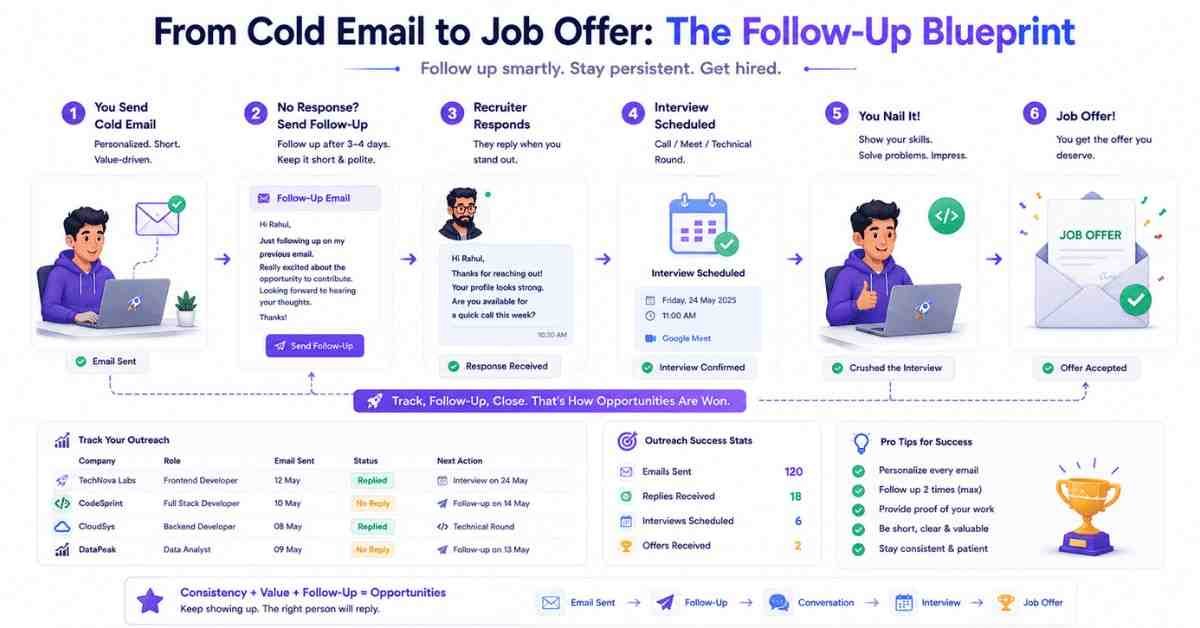
The Follow-Up Schedule:
- Day 1: Send the initial cold email.
- Day 4: If no reply, send Follow-Up #1.
- Day 9: If no reply, send Follow-Up #2 (The Breakup Email). If they don’t reply to this, move on to the next company.
The Perfect Follow-Up Template (Send as a reply to your original email):
“Hi [Name],
Bringing this to the top of your inbox in case you missed it.
I know you are incredibly busy, but I’d love to get your thoughts on the live project I linked below. Let me know if you are open to a quick 5-minute chat this week.
Best,
[Your Name]”
That’s it. One sentence. It is polite, non-intrusive, and highly effective. More than 50% of your interviews will come from the follow-up email, not the first one.
Before you go rogue and start spamming 500 CEOs, you must understand the rules of engagement. If you do this wrong, you will burn bridges.
- Do Not Spam: Do not put 50 HR managers in the BCC field and send one generic email. Cold emailing only works if it feels personal. Send 5 highly targeted, customized emails a day. Quality over quantity.
- Never Beg: You are a professional offering a service (your coding/designing/analyzing skills) in exchange for money (a salary). It is a business transaction. Act like a business partner, not a beggar.
- Double-Check Your Links: The entire strategy relies on your “Proof of Work.” If your Vercel link is broken, or your Google Drive portfolio requires them to “Request Access,” you look incredibly unprofessional. Test your links in an Incognito window before hitting send.
- Send at the Right Time: Do not send cold emails at 11:00 PM on a Friday. Send them on Tuesday, Wednesday, or Thursday between 9:30 AM and 10:30 AM. This is when decision-makers are actively managing their inboxes.
Conclusion: Your Action Plan for Today
Cold emailing is a superpower. When you learn how to confidently communicate with people who are more successful than you, your entire career trajectory changes. You stop asking for permission to be hired, and you start presenting yourself as the obvious choice.
Let’s review your action plan to bypass the ATS:
- Target 5 Companies: Pick 5 startups or mid-level companies you genuinely want to work for.
- Find the Decision-Makers: Use LinkedIn and Hunter.io to find the work emails of their HR Managers or CTOs.
- Draft the Emails: Use the templates above or the ChatGPT prompt to craft your 4-line pitch.
- Attach Your Value: Ensure your live project link is working and your ATS resume is attached as a PDF.
- Hit Send & Track: Send the emails at 10:00 AM. Mark your calendar to follow up in 3 days if they don’t reply.
What’s Next in the “Job Ready 2026” Series?
Cold emailing is perfect for reaching out to strangers. But what if you want to leverage people who already have a connection to you? What if you want to tap into the power of internal company referrals?
In Episode 8: The LinkedIn Referral Hack, we are going to look at the psychology of networking. I will show you how to find alumni from your exact college who are now working at massive MNCs (like Amazon, TCS, Google), and I will give you the precise 3-step message script to ask them for a referral without sounding desperate.
👉 Action Item for Today: Pick just ONE company. Find the HR’s email. Send your first cold email today. Break the fear of rejection.
Remember, a great cold email requires a great project link to back it up. If you are lacking strong, industry-level projects to show founders, the certification programs at Frontlines Edutech are designed to build exactly that. We give you the “Proof of Work” that makes cold emailing effortless. See you in the next post!