
Ready to transform raw data into compelling visual narratives? A working professional, student, or someone interested in data analytics, developing your first dashboard with SQL and Power BI is the ideal starting point. This easy-to-use guide enables you to learn everything step by step with no technical background necessary. We will go through the fundamentals, configuration, and workflow to enable you to start building dashboards with Power BI confidently with actual data from SQL.
You will also learn how dashboards can transform the way companies make decisions in 2025 and beyond.
Now let’s start your journey to the realm of data visualization!
Why Dashboards Matter in 2025
The Age of Data-Driven Decisions
All organizations are now surrounded by data sales and HR, customer behavior, finances, and more. But without context, raw data is worthless. That’s where dashboards come into play.
Dashboards enable professionals to:
- Visualize KPIs (Key Performance Indicators)
- Monitor trends and performance in real-time
- Share insights rapidly with decision-makers
Regardless of your finance, operations, or sales background, creating dashboards with Power BI can position you at the forefront of data-driven conversations.
 Looking to switch careers or upskill after a gap?
Join Frontlines Edutech’s coding & non-coding courses perfect for all levels.
Start your journey today toward a stable, rewarding career!
Why Choose Power BI and SQL?
- SQL assists you in pulling and shaping data out of databases.
- Power BI assists you in visualizing and displaying data nicely.
Together, they enable users to take raw information and turn it into an interactive report within hours. And the beauty of it? You don’t have to write code like a software programmer to do so.
Getting Started – What You Need
Install Power BI Desktop
You can download Power BI Desktop from Microsoft’s official website. It is compatible with Windows operating systems and is the primary tool used for developing dashboards.
Set Up Your SQL Database
If you’re new to SQL:
- Utilize free resources such as MySQL, PostgreSQL, or Microsoft SQL Server.
- Load sample data sets like sales history, employee details, or customer responses.
- Learn fundamental SQL commands such as SELECT, WHERE, and JOIN to retrieve pertinent data.
Power BI enables straight connection to your SQL database, hence the easy transition.
Step-by-Step Guide to Build Your First Dashboard
Let’s proceed through the entire beginner-friendly workflow to enable you to begin creating dashboards in Power BI with SQL data.
Step 1 – Connect Power BI to SQL Database
Launch Power BI Desktop.
- Home → Get Data → SQL Server.
- Enter the database and server names.
- Select the desired table(s) or execute a custom SQL query.
Power BI will load the data for visualization.
Step 2 – Clean and Transform Data (Power Query)
Prior to visualizing:
- Delete empty or duplicate rows.
- Rename columns for better clarity.
- Add calculated columns or filters if necessary.
- Merge/join tables if you are joining datasets.
This step is how you guarantee your dashboard is constructed on solid, clean data.
Step 3 – Add Visual Elements
When data is ready:
- Employ bar charts, line charts, tables, and cards to show KPIs.
- Utilize slicers to filter by category, date, or place.
- Include tooltips and legends to provide clarity.
This is where you start building dashboards with Power BI that really tell a story and don’t merely show numbers.
Step 4 – Create Interactivity
Power BI dashboards are interactive:
- Clicking on one chart filters others for you.
- Slicers enable users to drill into data by product, region, or team.
- Drill-down capabilities allow users to investigate data in greater detail.
Interactive dashboards make your insights more compelling and easy to use.
Step 5 – Publish and Share
When finished:
- Click Publish to publish your dashboard to the Power BI Service (cloud).
- Share with peers by email, Microsoft Teams, or a secure web link.
- You can also auto-refresh on a schedule if your SQL data is updated frequently.
Congratulations you’ve completed your first project of building dashboards with Power BI and SQL!
Best Practices for Dashboard Design
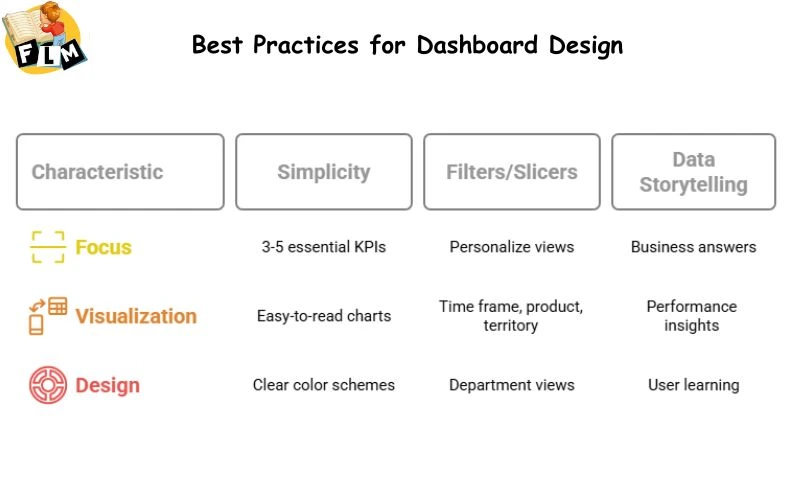
Keep It Simple
Don’t over-clutter your dashboard. Display only what is important:
- 3–5 essential KPIs
- Easy-to-read charts (bar, line, pie)
- Clear color schemes (no clutter)
Use Filters and Slicers Wisely
Rather than creating several dashboards for various departments, employ slicers to enable users to personalize views by:
- Time frame
- Product line
- Sales territory
Tell a Data Story
Dashboards are not just nice pictures they provide business answers such as:
- What’s contributing to profit?
- Where is performance declining?
- Which team or region is performing better?
Building dashboards with Power BI, always pose the question: What is the user attempting to learn?
Benefits of Creating Dashboards with SQL + Power BI
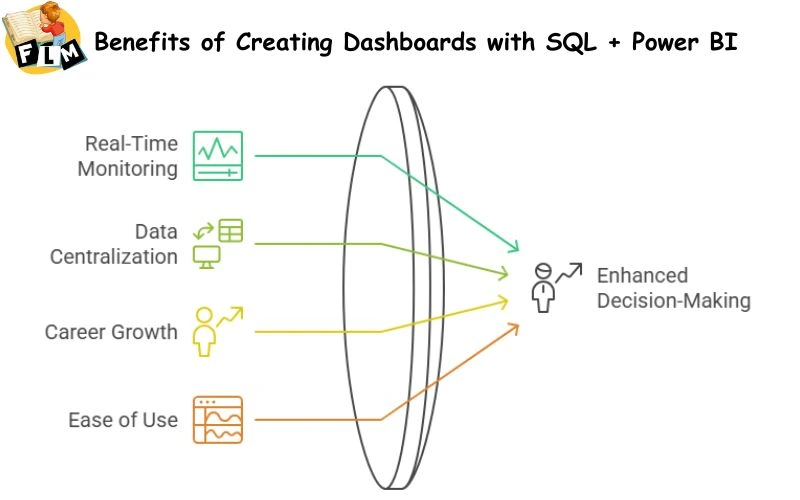
Real-Time Monitoring
Once linked to live SQL data, Power BI dashboards can auto-refresh and provide real-time updates enabling managers to act quickly.
Data Centralization
Dashboards consolidate data from disparate sources Excel, SQL, cloud apps into one source of truth.
Career Growth
Dashboard skills are highly sought after by professionals in jobs such as:
- Business Analyst
- Data Analyst
- BI Developer
Including Power BI and SQL in your skillset opens up more job opportunities and earning potential.
Easy to Learn, Powerful to Use
No heavy coding, no complicated tools. Even non technical professionals can create dashboards in Power BI in a matter of weeks.
Common Challenges and How to Overcome Them
Data Doesn’t Look Right
Double-check your SQL query and filters. Data cleaning in Power Query usually resolves 90% of the problems.
Visuals Are Confusing
Utilize good, readable titles, consistent colors, and don’t overload users with too many charts. Simple wins.
SQL Feels Intimidating?
Begin small. Master SELECT, filtering, and Joining data from simple sample databases. Numerous tutorials and practice websites are out there.
Looking to switch careers or upskill after a gap?
Join Frontlines Edutech’s coding & non-coding courses perfect for all levels.
Start your journey today toward a stable, rewarding career!
Final Thoughts
Creating your first dashboard using SQL and Power BI might feel overwhelming at first, but it’s actually a step-by-step journey. Once you’ve built your first interactive dashboard, you’ll realize how exciting and impactful data analytics can be.
Whether you want to automate your reporting work, impress your boss, or transition into a data career, building dashboards with Power BI is your first achievement.
By marrying SQL’s data pulling strength with Power BI’s easy-to-understand visuals, you’re not merely generating reports, you’re providing insights that inform decisions.
Begin constructing. Begin imagining. Begin to lead.
Suggested Articles:
-
How Mid-Level Professionals Are Switching Careers with Power BI + SQL
-
How to Start Learning Power BI + SQL While Working Full-Time
-
What Skills You Need Before Learning Power BI and SQL
Boost Your Career with FLM’s Power BI + SQL Data Analytics Training!
Master Data Visualization, Business Intelligence, and Database Management
Learn Power BI and SQL, the essential skills trusted by 97% of Fortune 500 companies to drive data insights.
This 45+ hour live, expert-led training will help you master data analysis, data storytelling, and database querying with hands-on real-world projects and professional guidance!
What You’ll Gain?
- In-Demand Power BI & SQL Skills for High-Paying Data Roles
- Expertise in Data Visualization and Business Intelligence
- Master Database Management and Query Optimization
- Hands-On Training with 2 Major & 2 Minor Real-World Projects
- Resume Building, Career Guidance & Mock Interviews
- Exclusive: 2-Year Recording Access for the First 100 Enrollees
Unlock your future with FLM’s Power BI + SQL Course
Limited Seats Only – Enroll Now!
Visit: frontlinesedutech.com | Click Here to Enroll
WhatsApp: 8333077727