
How to Build an ATS-Beating Resume in 10 Minutes Using ChatGPT
Table of Contents
Introduction
Chapter 1: The Invisible Bouncer – What is an ATS?
Let me guess. You spent four hours on Canva picking the perfect colors. You meticulously dragged and dropped little icons next to your phone number. You adjusted the columns so your education and skills sat perfectly side-by-side.
You downloaded it as a PDF, felt a surge of pride, and applied to 50 jobs on Naukri and company career pages.
One week has passed. Two weeks passed. Zero calls.
If this sounds like your life right now, take a deep breath. The problem isn’t your degree. The problem isn’t your marks. The problem is that a human being never even saw your beautiful resume.
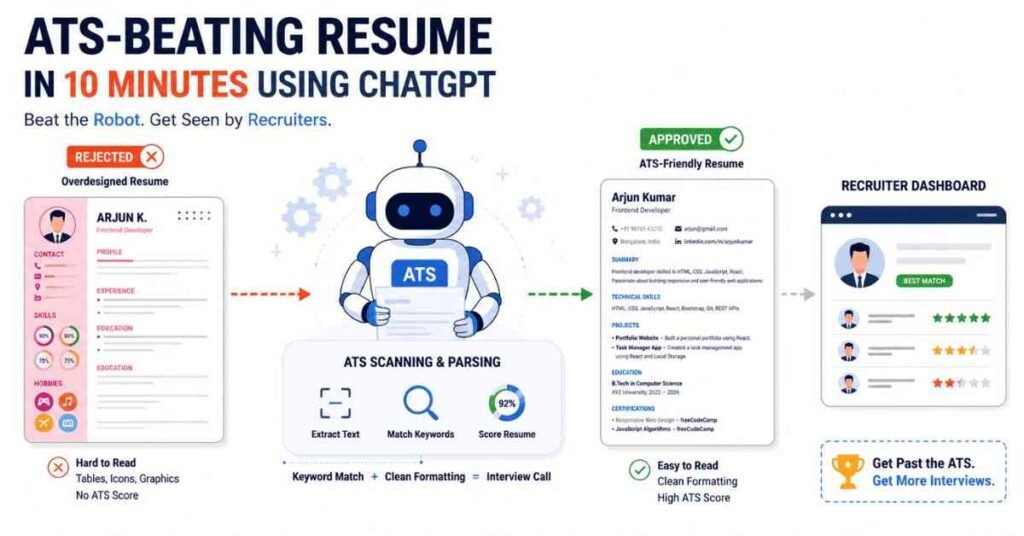
Before your resume ever reaches an HR manager, it has to pass through a ruthless, invisible bouncer. That bouncer is a robot, and its name is the ATS (Applicant Tracking System).
If you don’t know how to speak this robot’s language, you will keep getting rejected, no matter how talented you are. In this comprehensive guide, I am going to show you exactly what an ATS is, why it hates your current resume, and how to use ChatGPT to build a 100% ATS-friendly resume in less than 10 minutes.
Grab a coffee, open a new tab, and let’s hack the hiring process.
To understand how to beat the system, you first need to understand why the system exists.
Imagine you are an HR manager at TCS, Wipro, or Amazon. You post a job opening for a “Junior Frontend Developer.” Within 24 hours, you receive over 1,000 resumes. Do you really think a human HR professional is sitting there, sipping tea, reading all 1,000 resumes word-for-word?
Absolutely not. It is humanly impossible.
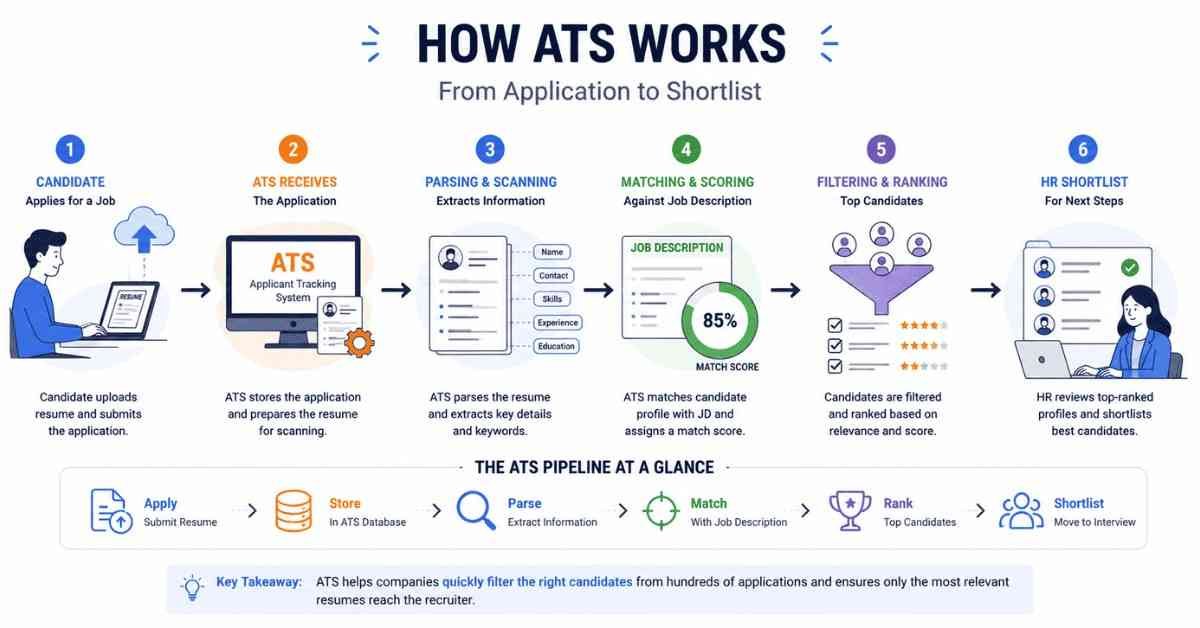
Instead, companies use an Applicant Tracking System (ATS). An ATS is an HR software that acts as a filter. When you hit “Submit” on an application, your resume doesn’t go to an inbox; it goes into the ATS database.
The software then “reads” (or parses) your resume, extracts the text, and scores it based on how well it matches the Job Description (JD).
- Keywords match? You get a high score, and the HR manager gets a notification to call you.
- Keywords missing or format unreadable? You get a low score, and your resume goes straight into the digital trash bin.
In 2026, over 95% of Fortune 500 companies and nearly all top startups use an ATS. Even job portals like Naukri.com use ATS-style algorithms to rank applicants. If you want a job, you have to please the robot first.
Chapter 2: The 5 "ATS Killers" (Why Your Current Resume is Failing)
The biggest mistake fresh graduates make is confusing a “creative” resume with a “good” resume. The ATS is not a human art critic. It is a very basic text-reading machine. It reads from left to right, top to bottom.
If you throw complex designs at it, it gets confused, scrambles your text, and gives you a score of zero. Here are the 5 things you must never do on an ATS resume:
1. Do Not Use Tables or Columns
This is the #1 reason resumes fail. When you put your text into two columns (for example, skills on the left, experience on the right), the ATS tries to read it straight across the page. It ends up mixing your skills with your project descriptions, creating a massive paragraph of gibberish. Stick to a simple, single-column layout.
2. Delete the Photos, Graphics, and Icons
You might think that little telephone icon looks cute next to your phone number, or that a progress bar showing you are “90% good at Python” looks professional. The ATS cannot read images. It will either completely ignore the graphics or, worse, crash the parsing process. Remove your headshot. Remove the icons. Use plain text.
3. Avoid Fancy Fonts
Just because a font looks unique doesn’t mean it’s readable. The ATS is programmed to recognize standard, web-safe fonts. If you use a custom cursive font you downloaded from the internet, the ATS might read it as blank space.
Safe Fonts: Arial, Calibri, Times New Roman, Garamond, Helvetica.
4. Keep Headers and Footers Empty
Many students put their Name, Email, and Phone Number in the “Header” section of Microsoft Word to save space. Big mistake. Many ATS parsers completely skip headers and footers. If the robot can’t find your contact info, how will the HR call you? Put your contact details directly in the main body of the document.
5. PDF vs. Word Document Confusion
Always check what file type the application portal asks for. While PDFs are great because they freeze your formatting (so it looks the same on every screen), some older ATS software still struggles to read PDFs and prefers Microsoft Word (.docx).
Pro Tip: Always build your resume in Word, keep a .docx version ready, and save a clean PDF version. If a portal gives you the option, upload the PDF but if it struggles to parse it, fall back on the Word document.
Chapter 3: The "Perfect 6" – The Only Resume Format You Need
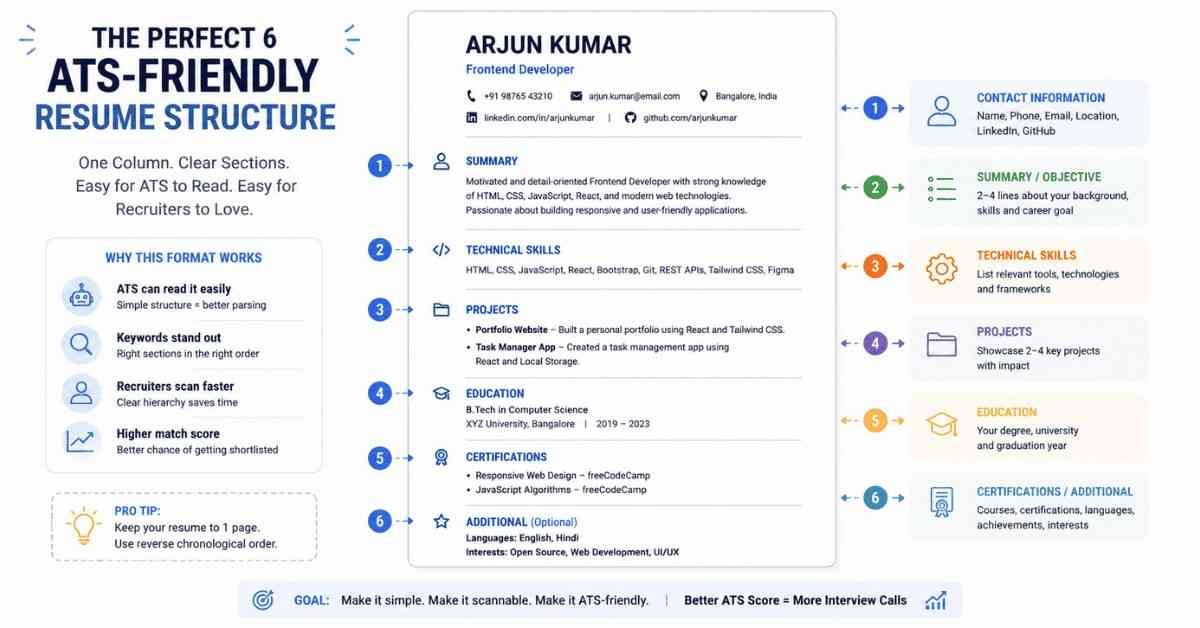
Now that we know what to avoid, let’s talk about what works. A high-scoring ATS resume is boring to the human eye, but it is pure poetry to a robot.
Your resume should be exactly one page long (you are a fresher, you do not need two pages) and contain only these 6 sections, in this exact order:
Section 1: Contact Information
Keep it plain and simple, right at the top.
- Your Full Name (Make this the largest text on the page).
- Phone Number (Include the country code, e.g., +91).
- Professional Email (e.g., firstname.lastname@gmail.com. Do not use coolboy.ashok@gmail.com).
- LinkedIn Profile URL (Make sure the link works).
- City, State (You don’t need your full house address).
Section 2: Professional Summary (Not an Objective!)
Do not write an “Objective” that says, “Looking for an opportunity to grow my skills and help the company.” The company doesn’t care about what you want. They care about what you can do for them.
Write a 2-3 line Summary.
Example: “Results-driven Frontend Developer skilled in React.js, JavaScript, and HTML/CSS. Built responsive e-commerce web applications with a focus on clean, scalable code. Seeking to leverage Vibe Coding and modern web development skills to drive user engagement.”
Section 3: Technical Skills
This is your Keyword Goldmine. Look at the Job Description, find the tools they are asking for, and list them here exactly as they are spelled.
Use a simple bulleted list separated by commas.
Example: HTML5, CSS3, JavaScript (ES6+), React.js, Node.js, MongoDB, Git, GitHub.
Section 4: Projects (The Heart of a Fresher’s Resume)
Since you don’t have corporate experience, your personal/college projects are your experience. Don’t just list the project name. Use the formula: Project Name + Tech Used + Measurable Result.
Example: “Spotify Clone | React.js, CSS3, API Integration | Live Link: [insert link]
- Developed a fully responsive music player UI using React.js.
- Integrated third-party APIs to fetch real-time song data, reducing load times by 15%.”
Section 5: Education
Keep it brief.
- Degree Name (e.g., B.Tech in Computer Science)
- College/University Name
- Graduation Year
- CGPA / Percentage
Section 6: Certifications
If you have completed a specialized training program, list it here. This proves you have gone above and beyond your college curriculum.
Example: “Certified Web Developer with Vibe Coding – Frontlines Edutech (2026).”
Chapter 4: The 10-Minute Hack – Using ChatGPT
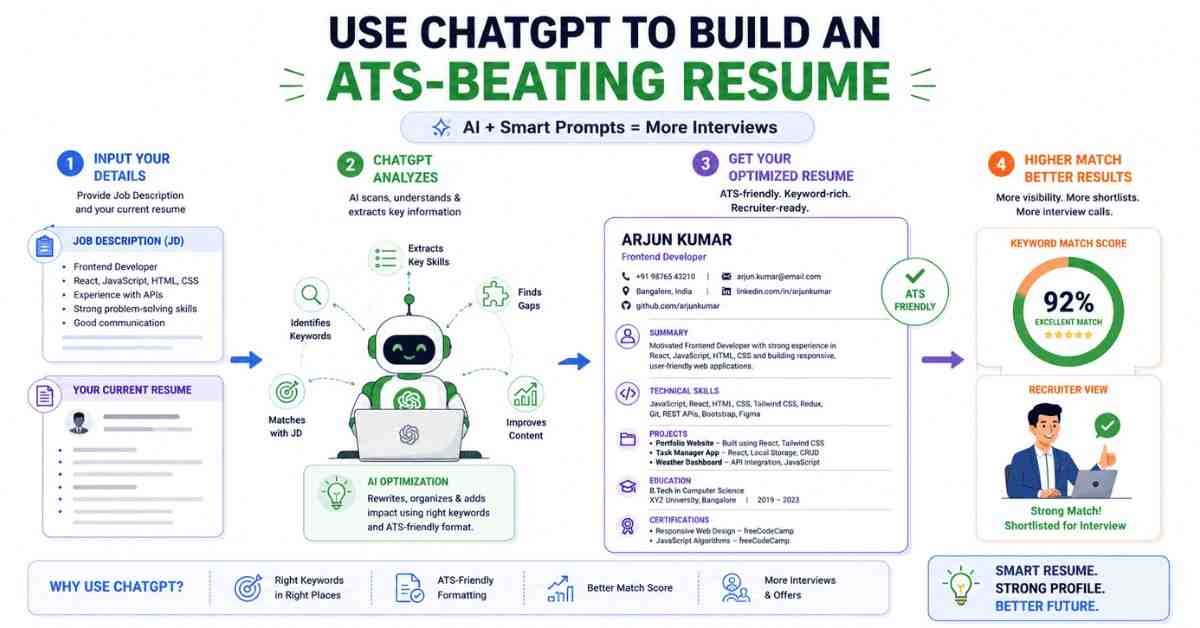
You now know the theory. Let’s execute it. You don’t have to sit and type this out manually for hours. We are going to use ChatGPT to generate a flawless, keyword-rich ATS resume in minutes.
Open ChatGPT, and copy-paste these exact mega-prompts.
(Note: Replace the bracketed information like [Your Name] with your actual details).
PROMPT 1: The Base Builder
This prompt sets up your foundation.
“Act as a Senior IT Recruiter and ATS expert. Create a 1-page ATS-friendly resume for a fresher applying for Web Development roles. Use standard section headings: Contact, Summary, Technical Skills, Projects, Education, and Certifications. >
Here is my data:
Name: [Your Name]
Phone: [Your Phone]
Email: [Your Email]
LinkedIn: [Your LinkedIn URL]
City: Hyderabad
Target Role: Frontend Developer / React Developer
Skills: HTML5, CSS3, JavaScript ES6+, React.js, Bootstrap, Node.js basics, MongoDB basics, Git, GitHub, Vibe Coding.
Projects: 1. Spotify Clone (React.js, Vercel) 2. Weather App (JavaScript, API integration).
Education: [Your Degree], [Your College], 2024, [Your CGPA].
Certifications: Web Development Bootcamp – Frontlines Edutech.
Formatting Rules: Use a single-column layout. Use bullet points. Start project bullet points with strong action verbs. Do not use tables. Keep it under 400 words.”
What to do next: ChatGPT will spit out a perfectly structured resume text. Copy this text, open a blank Microsoft Word document (or Google Docs), and paste it. Bold the headings. You now have your master resume.
PROMPT 2: The Job Description (JD) Matcher
You should never send the exact same resume to 50 different jobs. You need to tweak it slightly for each application. Find a job you want to apply for, copy the “Requirements” or “Job Description” text, and use this prompt:
“I am going to provide you with my current resume and a Job Description for a role I want to apply for. Please act as an ATS optimizer.
First, identify the core keywords in the Job Description. Second, rewrite my Professional Summary and my Project bullet points to naturally include these missing keywords. Ensure the final output is 100% ATS-friendly. Do not invent skills I do not have.
[Paste Your ChatGPT Resume Here]
[Paste The Job Description Here]”
PROMPT 3: The Project Upgrader
If your project descriptions feel weak (e.g., “I made a website using HTML”), use this prompt to make them sound highly professional.
“Review the following project descriptions from my resume. Rewrite them using the STAR method (Situation, Task, Action, Result). Use strong action verbs (e.g., Architected, Engineered, Developed). Focus on the technical skills used and invent a realistic, measurable impact (like ‘reduced load time by 20%’ or ‘improved UI responsiveness’). Make them sound recruiter-ready.
[Paste your current project descriptions here]”
PROMPT 4: The Final ATS Score Check
Before you download your resume as a PDF, let’s do a final safety check.
“Act as an enterprise ATS software (like Taleo or Workday). Review the resume text below against the Job Description below. Give me an ‘ATS Match Score’ out of 100. > List any critical keywords I am missing. Suggest 3 exact, line-by-line improvements I can make to get my score above 90.
Resume: [Paste customized resume]
Job Description: [Paste JD]”
Chapter 5: Good ATS vs. Bad ATS (The Visual Test)
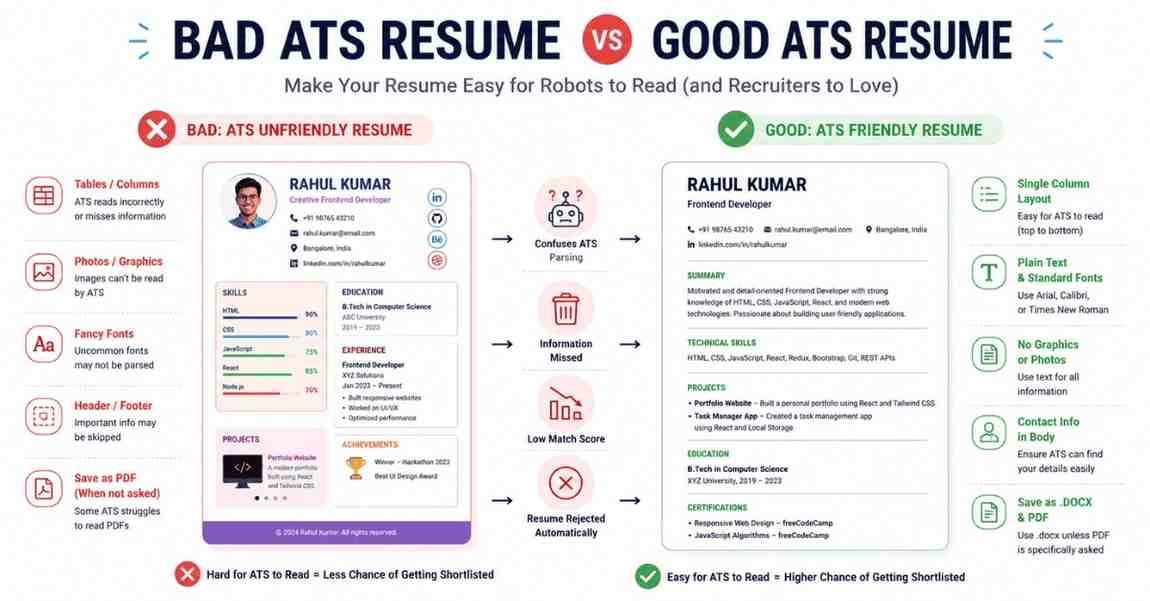
How do you know if you’ve done it right? Here is a simple visual test.
Select all the text on your final resume (Ctrl+A / Cmd+A) and paste it into a raw text editor (like Notepad on Windows or TextEdit on Mac).
The Bad ATS Resume:
If you paste the text into Notepad and the text gets scrambled, words are mashed together, your skills end up halfway down the page, or your contact info disappears you have failed. The ATS will see the exact same scrambled mess.
The Good ATS Resume:
If you paste the text into Notepad and it reads logically from top to bottom Name, Summary, Skills, Projects, Education you have succeeded! It might not look pretty in Notepad, but the hierarchy and data are intact. This means the robot can easily extract your information and rank you highly.
Conclusion: Your Next Steps
Stop letting a robot dictate your future. By stripping away the fancy formatting, sticking to a strict single-column structure, and using ChatGPT to inject the right keywords, you will dramatically increase your interview callbacks.
Remember, the goal of an ATS resume is not to get you the job. The goal of the ATS resume is to get your document in front of human eyes. Once the HR manager calls you, your actual skills, communication, and project knowledge have to do the rest of the talking.
Ready to Take the Next Step?
Building an ATS resume is only Phase 1 of the “Job Ready 2026” journey.
If you apply on Naukri but your profile isn’t optimized, HRs will still skip you. In our next blog post, I will reveal the 7 Hacks to Optimize Your Naukri.com Profile, including the exact time of day you need to update your profile to guarantee recruiter calls.
👉 Action Item for Today: 1. Open a blank Word Document.
- Copy the ChatGPT Mega-Prompts above.
- Build your Master ATS Resume right now.
If you found this guide helpful, share it with your college WhatsApp groups. The tech industry is massive, and there is room for everyone who knows how to play the game smartly.
For more career blueprints, interview hacks, and high-income skill training, keep following the Frontlines Edutech blog. See you in the next post!